 Freshslate
Can people see your TikTok reposts, likes and favorites?
Some of what you do on TikTok is public, some is only for friends, and some only you can ever see. This page goes through each one, from reposts and liked videos to watch history, searches, drafts and profile views, and tells you how to hide what you'd rather keep to yourself.
Quick answer: Reposts can be seen by anyone who can see your profile (everyone if you're public, only your followers if you're private), and they can show up in other people's For You feeds with your photo and nickname. Liked videos are hidden by default on new accounts and only show if you change the Liked videos setting. Favorites are private by default. Watch history, search history and drafts are only visible to you. Profile views are only shown if both you and the other person have the feature turned on.
The full table: who can see what on TikTok
Menu names below are for the current app on iPhone and Android. Most are under Profile → ☰ → Settings and privacy → Privacy. In some versions or regions a name may be a little different. If you can't find one, use the search bar at the top of Settings and privacy.
| What | Who can see it | How to hide it |
|---|---|---|
| Reposts | Anyone who can see your profile; also in other people's For You feeds, labeled with your photo and nickname | No hide switch. Remove reposts, or make your account private |
| Liked videos | Only you by default on new accounts; you can pick Everyone (public accounts) or Followers (private accounts) | Privacy → Liked videos → Only you |
| Favorites (bookmarks) | Only you by default (lock icon on the tab) | Privacy → Favorite videos → Only me; also check each collection |
| Following list | Depends on your setting | Privacy → Following list → Only me |
| Followers list | Usually visible to people who can see your profile; the number shows to everyone | Make your account private to limit the list |
| Watch history | Only you | Nothing to hide. You can delete or pause it |
| Search history | Only you | Nothing to hide. Clear it from the search screen |
| Drafts | Only you, on the phone you made them on | Already private |
| Profile views | Shown only if you and the other person both have Profile views on | Privacy → Profile views → off |
| Video (post) views | Shown only if the feature is on for both sides, where available | Privacy → Post views → off |
| Story views | The story's creator can see who viewed it | Don't open the story |
| Comments you write | Anyone who can see that video | Delete the comment |
| Activity status (online now) | Friends you message with, if it's on | Privacy → Activity status → off |
| Videos you post | Depends on each video's setting and your account | Set the video to Friends or Only me, or go private |
Can people see your reposts on TikTok?
Yes. Reposts are the most public thing on this list, and the one that surprises people most.
- On your profile: your reposts sit in the Reposts tab (two-arrows icon). Anyone who can see your profile can open it. If your account is public, that's anyone on TikTok.
- In For You feeds: TikTok can show your reposts in your friends' and other people's For You feeds. The video is labeled as a repost, with your profile photo and nickname on it.
- The original creator: may be able to see that the video was reposted, depending on the version of the app.
Can people see your reposts on TikTok if your account is private?
Only your followers can. TikTok says that on a private account, only your followers see your reposts, both on your profile and in their For You feed. People who don't follow you can still find your account in search and see your name, username and profile photo, but they can't open your videos or your Reposts tab.
Can people reply to your reposts?
Yes. Anyone who can see your repost can reply to it. TikTok says your comment privacy settings don't apply to repost replies, so limiting who can comment on your videos won't limit these. To delete one reply, open the video, tap your profile photo at the bottom, press and hold the reply and tap Delete.
Can you block people from seeing your reposts on TikTok?
There is no switch that hides the Reposts tab while keeping your account public. Your options are: remove the reposts, make your account private, or block a specific person (they then can't see your profile at all). For more ways to deal with this, see how to hide reposts on TikTok.
How to remove them
Open the video from your Reposts tab, tap Share, and tap Delete repost. You can also press and hold the video and tap Remove repost, or tap your profile photo at the bottom of the video and tap Remove. Removing a repost also deletes all the replies to it. That's one at a time. If you have a lot, read how to delete all reposts on TikTok.
Can people see your liked videos on TikTok?
It depends on one setting. TikTok says liked videos are hidden from your profile by default when you make a new account. You can change that if you want.
Check it here: Profile → ☰ → Settings and privacy → Privacy → Liked videos. The choices are Everyone (public accounts only), Followers (private accounts only) and Only you. If it says Only you, nobody else can see your likes. If it says Everyone, anyone can open your liked tab (the heart icon).
A quick way to tell: look at your own profile. If the heart tab has a small lock icon on it, your likes are private.
Can someone see my liked videos if my account is private?
If your Liked videos setting is Followers, your followers can see them. A private account only stops people who don't follow you. To hide likes from everyone, set it to Only you.
Does the creator know I liked their video?
Yes. A like is public in a different way: the creator gets a notification, and your name can appear in the list of people who liked their video. Making your Liked videos tab private doesn't change that. Full steps and more questions are in how to make your TikTok liked videos private.
Can people see your favorites (bookmarks) on TikTok?
By default, no. The Favorites tab (the bookmark icon) shows a lock on your profile, which means only you can see it. People use "favorites", "bookmarks" and "saved" to mean the same thing here.
You could have changed this yourself, though. Check: Profile → ☰ → Settings and privacy → Privacy → Favorite videos (in some versions it's called "Favorites"). If it's set to show on your profile, others can see it.
Favorite collections
If you sort favorites into collections, each collection can be public or private on its own in some versions. Open the collection, tap the three dots or "Manage", and check whether it's set to private.
Favorite sounds, effects and hashtags
Sounds, effects and hashtags you save are also in Favorites. They follow the same privacy as your Favorites tab, so if favorites are private, these are too.
Can people see your favorites on TikTok Shop?
Products you save or add to your cart in TikTok Shop aren't shown on your profile. Sellers may see overall numbers for their products, but not a public list of what you favorited.
Can someone tell if I favorited their video?
The creator usually sees a total number of saves on their video, but not a list of names. So they know someone saved it, not who. To clear out old saves, see how to remove favorites on TikTok.
Can people see who you follow on TikTok?
It depends on your setting. Go to Profile → ☰ → Settings and privacy → Privacy → Following list and choose Only me to hide the list. Your number of following still shows on your profile; only the list of names is hidden.
And your followers list?
Your follower count is always shown. The list of names is generally visible to people who can see your profile. A private account means only approved followers can open it. If you want to remove someone, open your Followers list, tap the three dots next to their name and remove them.
Can people see your watch history on TikTok?
No. Your watch history is only for you. Your followers, friends, and the creators you watch can't open it. It doesn't appear on your profile and there's no setting to share it.
A lot of people searched "can people now see your watch history on TikTok" after the feature moved around in the app. Nothing changed about who sees it. You find it in Profile → ☰ → Settings and privacy → Activity center → Watch history (or straight from the ☰ menu in some versions). From there you can delete videos or turn it off.
The only "leak" is the people you share your phone with. If someone can open your TikTok app, they can see your history. If you can't find yours at all, our TikTok watch history guide covers why it goes missing and how to see older history from your data file using the free watch history viewer.
Can people see what you search on TikTok?
No. Your searches are private. Nobody else can see what you typed, including your followers.
Can people see if you search them on TikTok?
No. Searching someone's name or opening search results doesn't notify them. The one thing that can show up is a profile view: if you tap into their profile and you both have Profile views on, they may see you visited. Searching alone isn't shown.
Can they see it in "suggested searches"?
Other people might see a name in their own search suggestions because of their activity or people they know, but TikTok doesn't share your search history with them. To clear your own recent searches, tap the search icon and tap × next to each one, or use "Clear all" where you see it. Full steps in how to delete TikTok search history.
Can people see your drafts on TikTok?
No, never. Drafts are only stored on the phone you made them on. They aren't on your profile and they aren't even saved to your TikTok account in the cloud. This is the same in 2026: "can people see your drafts on TikTok now" gets the same answer.
The flip side: because drafts live only on your phone, you can lose them if you delete the app, clear TikTok's data, or switch phones. If you're moving to a new phone, read how to keep TikTok drafts on a new phone first.
What about "Only me" videos?
A video you post as Only me is also hidden from everyone else. It sits on your profile with a lock icon that only you see.
Can people see that you viewed their TikTok profile?
Sometimes. TikTok has a feature called Profile views. It works both ways:
- If you have it on, people whose profiles you visit can see you if they also have it on.
- If you turn it off, you won't show up in anyone's list, and you won't see who viewed yours.
Turn it off here: Profile → ☰ → Settings and privacy → Privacy → Profile views. TikTok's Help Center says this list only covers recent visits (about the last 30 days) and that the feature isn't offered to every account, for example younger users or accounts with lots of followers. If you don't see the setting, it may not be available for you.
No outside app or website can show who viewed your profile. TikTok doesn't share that with anyone else, so anything that claims to is not telling the truth.
Can people see that you watched their video?
Usually not. A view just adds to the number. In some versions TikTok has a Post views setting that works like Profile views: if it's on for both of you, the creator may see you in a list of viewers. Turn it off in Privacy → Post views if you see it.
Stories are different. If you watch someone's TikTok story, they can see your name in the viewer list. That's true whether your account is private or not.
Also, a TikTok you share in a message may show the sender whether you've watched it. That's normal chat behavior, not your history.
Comments, activity status and other things people forget
Comments
Any comment you leave is public to everyone who can see that video, with your name on it. Making your own account private doesn't hide comments on other people's public videos. To find and delete old comments, our free My TikTok comments page lists every comment from your data file with a link back to each video.
Activity status
If Activity status is on, friends you chat with may see when you're online. Turn it off in Privacy → Activity status. When it's off, you can't see theirs either.
Mentions and tags
If someone tags you in a video, your name is linked there. You can limit who can mention you in Privacy → Mentions (wording varies).
Suggest your account to others
TikTok can suggest your account to your contacts or Facebook friends. You can turn this off in Privacy → Suggest your account to others.
What a stranger, a follower and a friend each see
It helps to picture three different people opening your profile. Here's what each one sees with the usual settings (public account, liked videos set to Only you, favorites private):
- A stranger (doesn't follow you): your name, photo, bio, follower and following counts, the videos you posted publicly, and your Reposts tab. They can't open your liked or favorites tabs because of the locks.
- A follower (follows you, you don't follow back): the same as a stranger, plus they may see your new posts in their Following feed.
- A friend (you follow each other): the same again, plus your videos set to "Friends", your reposts showing up in their feed, your stories, and your activity status if you have it on.
Now switch the account to private. The stranger now sees only your name, photo, bio and counts. Followers and friends you approved see the same as before. That's the main reason people with lots of reposts go private while they clean up.
Can your parents or someone on your phone see your activity?
Family Pairing
TikTok's Family Pairing lets a parent link their account to a teen's account. The parent can change some settings, like screen time limits, who can message the teen and whether the account is private. TikTok says the parent can't read your messages. Family Pairing is about controls, not a window into everything you watched. If you're not sure whether your account is linked, look in Settings and privacy → Family Pairing.
Someone who uses your phone
This is the real way most people's "private" activity gets seen. Anyone who opens your TikTok app sees exactly what you see: watch history, search history, drafts, favorites, likes and messages. Privacy settings protect you from other accounts, not from someone holding your phone. Lock your phone with a passcode, and if you share a tablet, log out of TikTok when you're done.
Other devices still logged in
If you logged into TikTok on an old phone, a friend's phone or a school computer, that device may still be signed in. Check Settings and privacy → Security → Manage devices (wording varies) and remove any you don't recognize.
A five-minute privacy check
- Liked videos → Only you.
- Favorite videos → Only me (and check each collection).
- Following list → Only me, if you don't want it shown.
- Profile views and Post views → off, if you don't want to be seen visiting.
- Activity status → off, if you don't want friends to see when you're online.
- Scroll your Reposts tab. Remove anything you wouldn't want a stranger to see.
- Tap search and clear recent searches if others use your phone.
That covers almost everything on the table above.
What changes with a private account
Going private hides your videos, reposts and liked videos (if you set them to Followers) from anyone who doesn't follow you. It also stops people from making Duets or Stitches with your posts, downloading them or adding them to their Stories. It doesn't hide your name, photo, username or bio, it doesn't stop people finding you in search, and it doesn't hide comments you left on public videos. Your existing followers keep access. For the full list of what changes and what doesn't, read how to make your TikTok account private.
How to check what others see
- Open your profile and look at the tabs. A lock on the heart or bookmark tab means it's private.
- Go through Settings and privacy → Privacy and check Liked videos, Favorite videos, Following list, Profile views and Activity status.
- Ask a friend who doesn't follow you to open your profile and tell you which tabs they can see. That's the most honest test.
- On tiktok.com, log out (or use a private browser window) and visit your own profile. You'll see roughly what a stranger sees.
Questions people ask
Can people see your reposts on TikTok?
Yes. Anyone who can see your profile can open your Reposts tab, and your reposts can show up in other people's For You feeds.
Can people see your reposts on TikTok if your account is private?
Only your followers can, on your profile and in their For You feed.
Can people see your favorites on TikTok?
Not by default. Favorites are private unless you chose to show them.
Can people see your bookmarks on TikTok?
Bookmarks are the same as favorites, so the answer is the same: private by default.
Can people see your liked videos on TikTok in 2025 and 2026?
Only if you changed the Liked videos setting. New accounts hide them by default. Set it to Only you to be sure.
Can people see your watch history on TikTok?
No. Only you can see it.
Can people see what you search on TikTok?
No. Searches are private.
Can people see if you search them up on TikTok?
No. Only a profile visit can show, and only when Profile views is on for both of you.
Can people see your drafts on TikTok?
No. Drafts stay on your phone and are never public.
Can people see who viewed their TikTok profile?
Only with Profile views turned on, and only for people who also have it on.
Can people you follow see your liked videos?
Only if your Liked videos setting lets them. On a public account the open choice is Everyone; on a private account it's Followers. Either way, Only you hides them.
Can your followers see what you favorite?
Not if your favorites are private, which is the default.
How do I know if people can see my favorites on TikTok?
Look for a lock icon on the bookmark tab on your profile. A lock means only you can see it.
How do I make it so people can see my favorites?
Go to Privacy → Favorite videos and choose to show them on your profile.
Can someone see if I favorite their TikTok?
They see a total count, not your name.
Can people see your saved posts on TikTok?
Saved posts are your favorites, so no, unless you made them public.
Can I see someone else's favorites on TikTok?
Only if they chose to make their favorites visible.
Faster: check and clean it all with Freshslate (coming soon)
If going through every setting sounds like a chore, Freshslate's Privacy Checkup walks you through who can see your reposts, likes, favorites and following list, one screen at a time. And if you decide you'd rather not have that history at all, the app removes reposts in bulk at a steady pace of about 2 seconds each, unlikes videos and clears favorites. You can lock the ones you want to keep.
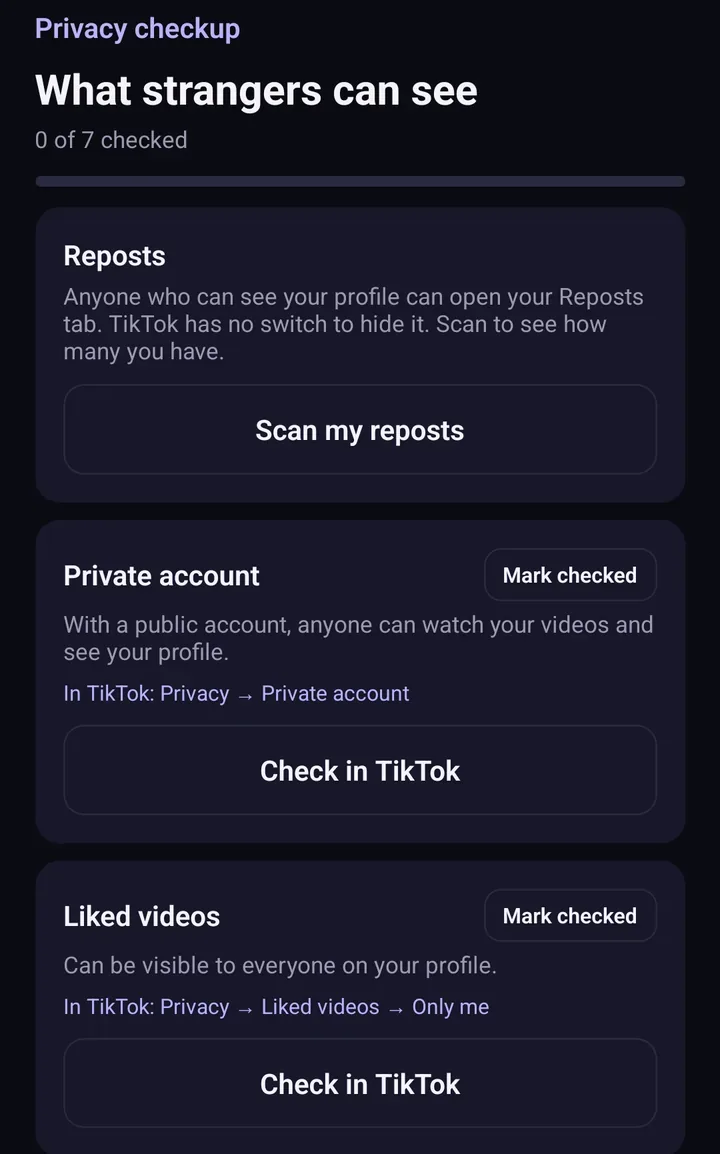
Screens from the test version of the Freshslate app. The final app may look slightly different.
You sign in on TikTok's own page inside the app, so Freshslate never sees your password, and everything stays on your phone. It's coming soon to iPhone and Android. You can try the interactive demo now.
Updated November 16, 2026. TikTok changes its menus from time to time; if a button has moved, tell us at [email protected].
Check your TikTok privacy in one place
Freshslate's Privacy Checkup walks you through who can see your reposts, likes, favorites and following list.
- Remove every repost in one go, and lock the ones you want to keep
- Unlike videos and clear your favorites in bulk
- Find any video you watched in your TikTok data download
- You sign in on TikTok's own page. Your password and data stay with you