 Freshslate
How to remove favorites on TikTok
Favorites are TikTok's bookmarks: videos, sounds, effects and more that you saved to come back to later. This guide shows where they live, how to remove one or a lot of them, how collections work, and who can actually see what you've saved.
Quick answer: Open the video you saved and tap the bookmark icon on the right side (it's filled in yellow when the video is a favorite). It turns white and the video leaves your Favorites. To find your saved videos, go to Profile and tap the bookmark tab. TikTok has no "remove all favorites" button, so you either remove them one by one or use a bulk tool. Your Favorites tab is private in most versions, shown by a small lock.
Where are favorites on TikTok?
"Where are favorites on TikTok" is a fast-rising search, and it makes sense. TikTok has moved and renamed this feature a few times. Some people still call it "saved videos" or "bookmarks." They're all the same thing.
On your phone
- Open TikTok and tap Profile in the bottom right.
- Look at the row of small icons just under your bio and the Edit profile button.
- Tap the bookmark icon (a little ribbon shape). This is your Favorites tab.
Inside Favorites you'll usually see a few smaller tabs across the top, such as Posts (or Videos), Collections, Sounds, Effects and sometimes Hashtags, Products, Places or Playlists. Which ones you get depends on your app version and country. Tap each one to see what you've saved in it.
On the website
On tiktok.com, click your profile picture, then go to your profile. Your Favorites tab sits next to your Videos and Liked tabs. In most cases the website only shows your favorite videos and collections, not your favorite sounds or effects. Those are easier to manage in the app.
Can't see the bookmark tab? Scroll up to the very top of your profile, and make sure you're on your own profile, not someone else's. If it's still missing, update the app. On TikTok Lite, the Favorites tab may be missing or harder to find.
How to remove a video from favorites
There are two easy ways to unfavorite a single video. Both work on iPhone and Android.
From your Favorites tab
- Go to Profile → bookmark tab → Posts (or Videos).
- Tap the video you want to remove so it opens full screen.
- On the right side, find the bookmark icon. It's below the comment bubble and above the share arrow, and it's yellow when the video is saved.
- Tap it once. It turns white, and you may see a short message like "Removed from Favorites."
The video may still show in your Favorites grid until you leave the tab and come back. Pull down to refresh, and it's gone.
From the video while scrolling
If a saved video shows up on your For You or Following feed, you'll see the yellow bookmark. Just tap it to remove it from your Favorites. You can also press and hold on the video in some versions and look for a Favorites option in the menu that pops up.
From the share menu
In some versions, the Favorites button is also inside the share menu instead of, or as well as, on the right side of the video. Tap the share arrow and look for Remove from Favorites or a filled bookmark you can tap.
Does the creator get told? TikTok doesn't appear to send a "removed from favorites" alert. Removing a favorite is quiet. Adding one may not be, though; see are TikTok favorites private.
Remove favorites on PC or the website
If you'd rather sit at a computer, you can remove favorite videos on tiktok.com in most cases.
- Go to tiktok.com and log in.
- Click your profile picture to open your profile.
- Click the Favorites tab.
- Click a video to open it.
- Click the bookmark icon next to the video so it's no longer filled in.
- Press the down arrow on your keyboard, or click the arrow on screen, to go to the next one.
A bigger screen and a keyboard can make it a bit faster to go through a long list. Changes on the website and the app are linked to your account, so anything you remove on your computer is also gone on your phone. It can take a few minutes for the two to match, so don't panic if your phone still shows a video you just removed.
About searches for a "remove favorites TikTok extension": browser add-ons that click through your favorites for you exist, but be very careful. Never type your TikTok password into anything that isn't TikTok's own page, and watch out for add-ons that ask for access to every site you visit.
Remove favorite sounds, effects, hashtags and more
Favorites aren't only videos. You can save sounds, effects (filters), hashtags and, in some regions, products, places and even comments. People search things like "how to remove all favorite sounds on TikTok," so here's how to clear each type.
Favorite sounds
- Go to Profile → bookmark tab → Sounds.
- Tap a sound to open its page.
- Tap the Added to Favorites button (or the filled bookmark) so it switches back to "Add to Favorites."
You can also do it while making a video. Tap Add sound at the top of the camera, open the Favorites tab in the sound picker, and tap the bookmark next to any sound to remove it.
Favorite effects
Go to Profile → bookmark tab → Effects, tap the effect, then tap Added to Favorites to remove it. In the camera, you can also open the Effects panel, find the Favorites (bookmark) section, and remove effects from there.
Favorite hashtags, products and places
If you see these tabs in your Favorites, the steps are the same: tap the item to open its page, then tap the filled bookmark or Added to Favorites button to unsave it.
Favorite comments
In some versions you can favorite a comment by pressing and holding it. To remove one, find the comment again, press and hold it, and pick Remove from Favorites if that option appears.
There's no "clear all" for any of these types either. Most people have far fewer saved sounds and effects than saved videos, so doing these by hand usually only takes a few minutes.
Delete a favorites collection
Collections are folders inside your Favorites. You might have one called "Recipes," one for "Workouts," and so on. People search "delete TikTok favorite collection" and "how to delete TikTok favorites folder" a lot, so here's how they work.
Delete a whole collection
- Go to Profile → bookmark tab → Collections.
- Tap the collection you want to delete.
- Tap the … (three dots) in the top corner.
- Tap Delete collection and confirm.
Important: Deleting a collection removes the folder, but in most versions the videos inside it stay in your Favorites. So if you want those videos gone too, remove them from Favorites first (or after) using the bookmark icon. Otherwise you'll find them still sitting in your Posts tab.
Take videos out of a collection
- Open the collection.
- Tap … and choose Manage videos (in some versions it's "Manage" or "Edit").
- Select the videos you want to take out and tap Remove.
This takes them out of that folder only. They stay saved in your main Favorites list. Manage videos is also the closest thing TikTok has to a multi-select for favorites, since you can tick several videos at once. But it only moves them out of the folder; it doesn't unfavorite them.
Rename a collection or change who can see it
Open the collection, tap …, and look for Edit collection or a similar option. Depending on your version you can rename it and, in some cases, choose whether it's public or private. A public collection can be shared with friends. If you don't want anyone seeing it, keep it private or delete it.
How to remove all favorites on TikTok at once
"Remove all favorites TikTok," "mass remove favorites," "bulk delete TikTok favorites": these are some of the most common searches about this feature. The honest answer is that TikTok has no button to remove all your favorites at once. There's no "clear all" in settings, in the Favorites tab, or on the website. Here are your real choices.
Option 1: Remove them one by one, quickly
This is the fastest built-in way:
- Open Profile → bookmark tab → Posts.
- Tap the first video in the top left.
- Tap the yellow bookmark to remove it.
- Swipe up to the next saved video.
- Tap the bookmark again. Repeat.
Tap, swipe, tap, swipe. Once you get into a rhythm you can clear a few hundred in a sitting. Take breaks, because tapping nonstop for a long time can make TikTok slow you down. TikTok's Help Center says that if you like videos too fast you may get an alert and should wait 24 hours, and it's fair to expect similar limits for other quick, repeated taps.
Option 2: Keep them, but make sure nobody can see them
If what bothers you is other people seeing your saves, you might not need to remove anything. Check that your Favorites tab has a lock (see the next section). If it does, the list is already just for you.
Option 3: Use a bulk tool
If you have thousands of saved videos, removing them by hand can take hours. People search "TikTok favorites remover" and "3rd party app to remove all TikTok favorites" for this reason. Pick carefully: never give your password to a tool, and avoid anything that promises instant removal, since going too fast can get your account limited.
Freshslate, coming soon to iPhone and Android, will clear favorites in bulk. You sign in on TikTok's own page inside the app, so Freshslate never sees your password. It scans your Favorites, lets you search and sort them by creator, caption or date, and lets you lock the ones you want to keep. Then it removes the rest at a steady pace of about 2 seconds each, so TikTok doesn't block you. You can pause and come back. Everything stays on your phone; there are no Freshslate servers.
Does deleting TikTok remove favorites?
Deleting the app from your phone does not. Your favorites are saved to your account, so they come back when you log in again. Only permanently deleting your whole TikTok account removes them, and that removes everything else too.
Are TikTok favorites private?
This is a rising search in Google Trends, and the short answer is: your Favorites tab is private by default in most versions, but you should check. Here's what that means and how to be sure.
Your Favorites tab
Look at the bookmark tab on your profile. If it has a small lock, only you can see it. In most versions, favorites stay hidden unless you chose to show them. So unless you turned that on at some point, your saves are probably already private.
How to check or change it
- Go to Profile → ☰ → Settings and privacy → Privacy.
- Look for Favorite videos (sometimes just "Favorites").
- Pick the option that keeps them to yourself (it may say Only you or Only me), or the option that shows them to others if you want people to see them. The exact names can differ by version.
If you don't see this setting, your favorites are most likely private with no option to show them in your version. The lock on the tab is the easiest check.
Can the creator see that I favorited their video?
Possibly. In some versions, TikTok has shown creators the names of people who added their videos to Favorites, in their notifications. Whether that happens now depends on your version and region, but it's safest to assume a creator may see that you saved their video, even if your Favorites tab is locked. The lock hides your list from visitors. It doesn't make each save secret from the person who made the video.
Public collections
In some versions, individual collections can be made public and shared. If you made a collection public, people with the link (or visitors to your profile, depending on the version) may see it. Open each collection and check its setting.
If your account is private
A private account limits your whole profile to followers you approve. So even if you chose to show your Favorites, strangers couldn't see them. See how to make your TikTok account private and the full rundown in can people see your TikTok reposts, likes and favorites.
Watch out for "see someone's favorites" tools. No outside app can show you another person's private favorites or a private account. If one claims it can, it's not telling the truth, and it may be after your login.
Why can't I remove favorites on TikTok?
Searches like "couldn't remove from favorites TikTok," "can't remove video from favorites" and "why can't I remove favorites on TikTok" come up a lot. Here are the real reasons it fails and what to try.
- The video was deleted or made private. If the creator removed the video, it may show as a gray box or "Video unavailable" in your Favorites, with no bookmark to tap. These usually clear themselves after a while. Try opening it and pressing and holding to see if a remove option appears, or wait a day and refresh.
- The change hasn't synced yet. TikTok can take a little while, sometimes several minutes, to update your Favorites list everywhere. Close the tab, wait, and check again before you remove it a second time (or you might save it again by mistake).
- You removed it from a collection, not from Favorites. Taking a video out of a collection leaves it in your Favorites. Open the video and tap the bookmark itself.
- Weak connection. The bookmark may look white on your screen but snap back to yellow when the app reloads. Get on solid Wi-Fi and try again.
- You're tapping too fast. After a long run of quick taps, TikTok can stop accepting changes for a bit. If you get an alert, wait up to 24 hours (that's what TikTok advises for liking too fast), then go at a calmer pace.
- Old app version or a glitch. Update TikTok, close it fully, and reopen it. If that fails, log out and back in.
- Clearing the cache. Some people clear TikTok's cache from Settings and privacy → Free up space (it may sit under a "Cache" or "Storage" heading in your version). This can fix loading problems. It doesn't delete your favorites, but it's a good idea to save any drafts first, since clearing app data (not just cache) can remove drafts. See what happens to TikTok drafts.
If a video still won't leave after all that, report it through Settings and privacy → Report a problem (under Support in some versions).
Favorites not showing or not loading
The opposite problem is just as common: "TikTok favorites not showing," "not loading" or "did TikTok remove favorites?" TikTok has not removed the Favorites feature. If yours look empty or broken, try these:
- Pull down to refresh on the Favorites tab, or switch tabs and come back.
- Check your connection. Favorites load from TikTok's servers, so they won't show offline.
- Check the account. If you have more than one, make sure you're on the one you saved things with.
- Update the app. A big update can move the Favorites tab or change its icon.
- Look in the sub-tabs. If Posts looks empty, check Collections. Your videos might be filed there.
- Some videos vanish on their own. If creators delete videos or go private, those drop out of your list.
If you're trying to find something you saved a long time ago and can't spot it, your TikTok data file usually includes a list of your favorite videos. Request it from Settings and privacy → Account → Download your data (steps in download your TikTok data). TikTok says the file may take a few days to prepare, and it stays in the Download data tab for up to 4 days. Then open it in our free watch history viewer, which reads it in your browser without uploading it. Want to see your saves next to your watching habits? The TikTok stats page uses the same file. And if it was a video you watched but never saved, check your TikTok watch history.
Favorites vs. likes vs. collections
These overlap a lot, so here's a simple way to keep them straight.
| Favorites | Collections | Likes | |
|---|---|---|---|
| What it is | Your saved videos, sounds, effects and more | Folders inside Favorites | Videos you tapped the heart on |
| Icon | Bookmark | Folder tiles in the Collections tab | Heart |
| Private by default? | Yes, in most versions (lock icon) | Usually private; some can be made public | Hidden by default on new accounts; check Privacy → Liked videos |
| Remove one | Tap the yellow bookmark | … → Manage videos → Remove | Tap the red heart |
| Remove all in TikTok | No button | Delete the collection (videos stay in Favorites) | No button |
| Creator may see it? | Possibly, in notifications | Only if public | Yes, usually |
If you're cleaning up likes too, see how to make TikTok liked videos private. For reposts, which have no privacy switch at all, see how to delete all reposts on TikTok.
Questions people ask
How do you delete favorites on TikTok?
Open the saved video and tap the yellow bookmark icon on the right. It turns white and the video leaves your Favorites.
Can you remove all favorites on TikTok at once?
Not inside TikTok. There's no "remove all" button. You can remove them one by one with tap-and-swipe, or use a bulk tool such as Freshslate (coming soon).
How do I remove favorites on TikTok fast?
Open the first video in your Favorites tab, tap the bookmark, swipe up, and repeat. Keep a steady rhythm and take breaks so TikTok doesn't slow you down.
Where are favorites on TikTok?
On your profile, tap the bookmark icon under your bio. That's your Favorites tab, with sub-tabs for posts, collections, sounds, effects and more.
Are TikTok favorites private?
In most versions, yes. Your Favorites tab is private by default and shows a lock. Check Settings and privacy → Privacy → Favorite videos to be sure.
Are TikTok favorites public?
Only if you chose to show your Favorite videos to others, or made a collection public. Otherwise only you can see them.
Can people see if you favorite their TikTok?
Possibly. In some versions TikTok has shown creators who saved their videos. Assume the creator might see it, even if your Favorites tab is locked.
How do I hide favorites on TikTok Lite?
TikTok Lite has fewer settings. If you can't find the Favorites privacy option there, change it once in the full TikTok app or on tiktok.com. It applies to your whole account.
Does deleting a collection delete the videos?
No. In most versions the videos stay in your main Favorites list. Remove them with the bookmark icon if you want them gone too.
How do I remove a bookmark on TikTok?
"Bookmark" and "favorite" are the same thing on TikTok. Tap the filled bookmark icon on the video to remove it.
Why can't I remove a video from favorites on TikTok?
Usually the video was deleted by the creator, your change hasn't synced yet, or you removed it from a collection instead of from Favorites. Refresh, wait a bit, and try the bookmark icon again.
Can I disable favorites on TikTok?
No, you can't turn the feature off. You can keep the tab private and simply not save videos.
Can people see your favorite sounds on TikTok?
Your saved sounds sit inside your Favorites tab, which is private in most versions. If the tab has a lock, nobody else can see them.
Does deleting TikTok remove favorites?
Deleting the app doesn't. Your favorites are tied to your account and come back when you log in. Only deleting your account removes them.
Did TikTok get rid of favorites?
No. The feature is still there under the bookmark tab on your profile. If it looks missing, update the app and refresh the tab.
How do I clear TikTok favorite videos but keep a few?
By hand, just skip the ones you want as you swipe. With Freshslate, you'll be able to lock the keepers first so only the rest get removed.
Faster: clear favorites in bulk with Freshslate (coming soon)
TikTok makes it easy to save a video and slow to un-save a thousand of them. Freshslate, coming soon to iPhone and Android, scans your Favorites, lets you search and sort them, keep the ones that matter, and clear the rest at a safe, steady pace. You can pause anytime and pick up later. Its Privacy Checkup also shows whether your favorites, likes, reposts and following list are visible to other people. Curious? Try the interactive demo on a sample profile.
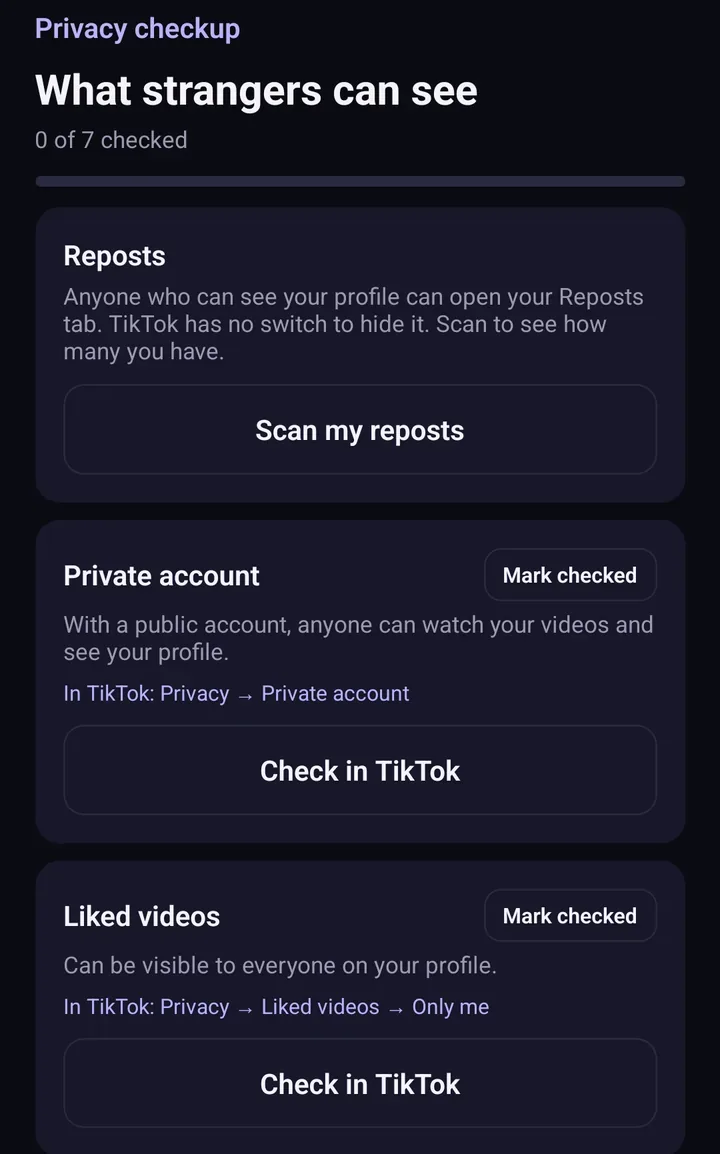
Screens from the test version of the Freshslate app. The final app may look slightly different.
Updated November 16, 2026. TikTok changes its menus from time to time; if a button has moved, tell us at [email protected].
Clear hundreds of TikTok favorites in one go
Freshslate (coming soon to iPhone and Android) scans your Favorites so you can keep the ones you want and clear the rest.
- Remove every repost in one go, and lock the ones you want to keep
- Unlike videos and clear your favorites in bulk
- Find any video you watched in your TikTok data download
- You sign in on TikTok's own page. Your password and data stay with you