 Freshslate
How to reset your TikTok For You page
Tired of seeing the same kind of videos? TikTok now has a real reset button for the For You feed. Here's where it is, what it actually wipes, what it leaves behind, and how to stop your FYP from drifting right back to where it was.
Quick answer: In the TikTok app, go to Profile → ☰ → Settings and privacy → Content preferences → Refresh your For You feed, then tap Continue and confirm. Your feed starts over as if you just joined. It can't be undone. It doesn't delete your likes, reposts, favorites, follows or keyword filters. To keep the new feed clean, tap Not interested on videos you don't want, add keywords under Filter keywords, use Manage topics, and think about clearing old likes and reposts that still tell TikTok what you used to like.
How your For You page decides what to show
Before you reset anything, it helps to know what you're resetting. TikTok doesn't pick your For You videos at random. It watches what you do and guesses what you'll watch next. The biggest signals are:
- What you watch, and for how long. Watching a video to the end, or watching it twice, is a strong "more of this" signal. This is the big one, even if you never tap anything.
- What you like, repost, favorite, share and comment on. Each one tells TikTok you care about that kind of video.
- Who you follow and which creators you visit.
- What you search for.
- What you skip or mark Not interested.
- Your language, location and device settings, which set the starting point.
So a "messed up" FYP usually isn't broken. It's doing its job based on old habits. Maybe you watched a few videos about one topic during a hard week and now it's all you get. Maybe someone else used your phone. Maybe your interests just changed. A reset clears TikTok's guesses, but the signals above start building up again right away, so the second half of this guide matters as much as the first.
How to reset your FYP with Refresh your For You feed
TikTok first tested a feature called Refresh your For You feed in 2023 and has since rolled it out in most regions, so most people now have it. TikTok describes it as letting you see For You videos as if you just signed up. This is the closest thing to a true "reset fyp" button.
On iPhone and Android
- Open TikTok and tap Profile in the bottom right.
- Tap the ☰ menu in the top right.
- Tap Settings and privacy.
- Tap Content preferences.
- Tap Refresh your For You feed.
- Read the screen, then tap Continue.
- Confirm by tapping Refresh (the last button's wording can differ a little).
Go back to the For You tab. The first videos you see will be more general and popular, not matched to your old habits. As you watch, like and skip, TikTok starts learning again from scratch.
You can't undo this. Once you refresh, your old recommendations are gone. If parts of your FYP were great (a niche hobby, small creators you love), follow those creators first so you can find them on the Following tab afterward.
The steps are the same on iPhone and Android
The menu is the same on both. The only difference people notice is the position of the ☰ icon on some Android phones, and that older app versions may not have the option at all. If the button is missing, update TikTok first.
What Refresh erases and what it doesn't
People type "refresh your for you feed tiktok meaning" because the screen doesn't say much. Here is what changes and what stays.
What Refresh changes
- Your For You recommendations start over. TikTok stops using your old viewing history to choose For You videos.
- Your feed shows more general, popular videos for a while, until it learns your new interests.
What Refresh does NOT touch
- Your likes. Every video you've liked is still in your Liked tab.
- Your reposts. They're still on your profile's Reposts tab for anyone who can see your profile.
- Your favorites and collections.
- Who you follow, your followers, and your Following feed.
- Your own videos, drafts, comments and messages.
- Your watch history list. TikTok doesn't say a refresh clears it, so delete entries yourself if you want them gone.
- Your search history.
- Your keyword filters and other content settings. Those stay on after a refresh.
That last part is good news: you won't lose the filters you set up. But the rest is the catch. Your old likes and reposts are still sitting on your account. A refresh tells TikTok to stop using your past for For You, but if you keep tapping the same kind of videos, or your old activity is still part of your profile, you can end up back where you started within days. That's why the tools below exist.
Refresh not working or not showing?
"Refresh your for you feed tiktok not working" is a common search. Here are the real causes.
The option isn't in Content preferences
- Update the app. Go to the App Store or Google Play and update TikTok. Old versions don't have the option.
- Your region may not have it yet. TikTok releases features in stages. If you're up to date and still don't see it, it may not be in your country or on your account yet.
- TikTok Lite. The Lite app often has fewer settings. Try the full TikTok app.
- Look in a slightly different place. In some versions, Content preferences is a section heading with items below it, rather than one button. Scroll through Settings and privacy.
I refreshed but my FYP looks the same
- Close and reopen TikTok. The feed you were scrolling may have been loaded before the refresh.
- Watch out for your first few minutes. If you go straight back to watching the same type of video to the end, TikTok learns it again fast. For the first hour, skip what you don't want quickly, and watch what you do want.
- Your follows still count. Creators you follow can still show up on For You.
- Trends are trends. Videos that are huge right now show to almost everyone, reset or not.
I got "too many times" or nothing happened
If you tap Refresh again soon after using it and nothing seems to happen, close the app, update it and try again later. In the meantime, the other tools below keep working.
Not interested: the small reset you can do every day
Refresh is a big, one-time wipe. Not interested is a small, steady fix, and honestly it does more over time. Each time you mark a video Not interested, TikTok shows fewer like it.
How to tap Not interested
- On a video in your For You feed, press and hold on the screen. Or tap the Share arrow on the right.
- Tap Not interested.
In many versions, you'll also see More details or similar after tapping, where you can say why: you don't want videos from this creator, or you don't want videos with this sound. Pick the one that fits.
Swipe fast instead of watching
Since watch time is the biggest signal, simply skipping videos you don't want, within a second or two, teaches TikTok a lot. People often "hate-watch" a video to the end. TikTok reads that as interest.
"Why this video"
Some versions let you tap Share and then Why this video to see the reasons a video was shown to you (for example, it's popular in your area, or similar to videos you've watched). That screen can also link to your For You settings. It's a useful clue when one topic keeps popping up.
Filter video keywords
If there's a word or topic you never want to see (a show you haven't watched yet, a diet topic, a news story), filters are stronger than Not interested.
- Go to Profile → ☰ → Settings and privacy → Content preferences.
- Tap Filter keywords (some versions say Filter video keywords).
- Tap Add keyword.
- Type the word or hashtag, choose whether to filter it from For You, Following or both, and save.
In 2025, TikTok said you can add up to 200 keywords and that a "smart" filter can also catch similar words and slang. The limit and options can differ by version, and yours may show a switch for this. Filters stay in place even after you refresh your For You feed.
Filters aren't perfect. They look for the word in a video's caption, hashtags and some other text, so a video about the topic that never uses the word can slip through. Use Not interested to catch those.
Manage topics
TikTok added Manage topics in 2025. It lets you turn topics up or down instead of blocking them completely.
- Go to Profile → ☰ → Settings and privacy → Content preferences → Manage topics.
- You'll see a list of broad topics (like food and drink, fashion and beauty, pets, nature, sports and more).
- Drag each slider toward more or less.
TikTok says this won't remove a topic completely. Turning sports all the way down means less sports, not zero. It also only affects your For You feed, not your Following feed.
This is the best tool for "how to change your fyp" when you want to steer it, not just wipe it. Use it right after a refresh to tell TikTok where to start.
In some versions you can also reach it from a video: tap Share → Why this video → Adjust your For You, or similar.
Clear your watch history and searches
Your watch history and search history are records of the same habits that shape your feed. Clearing them doesn't do a full reset on its own, but it's a sensible part of starting over, and it stops old searches from showing up when you tap the search box.
Watch history
In most versions: Profile → ☰ → Settings and privacy → Activity center → Watch history. You can delete videos from the list, and in some versions pause or turn off history. It usually shows about the last 180 days. Some accounts, regions and versions don't have it at all. Our TikTok watch history guide covers where it went and what to do if it's missing.
Be clear on one thing: deleting entries from the watch history list removes them from the list you see. TikTok doesn't say that this alone resets For You. Use Refresh for that.
Search history
Tap the search icon. Your recent searches show under the box. Tap the × next to one to remove it, or use the option to clear all where your version offers it. Step-by-step: how to delete TikTok search history.
Want to see what shaped your feed first?
Before you wipe things, you can request your TikTok data file and look back at what you watched and searched. Our free watch history viewer opens the file in your browser (it's never uploaded) and shows every video you watched by day, plus your likes, favorites and searches. Your TikTok year shows your top searches and busiest hours from the same file, which is a quick way to spot the topic that took over your feed.
Clean up likes, reposts and favorites
This is the step most reset guides skip, and it's why many people say "I refreshed my FYP and it went right back."
Refresh doesn't delete anything on your account. Every video you ever liked, reposted or favorited is still there. These are some of the clearest "I like this" signals you've ever given TikTok, and they're still attached to your profile. TikTok doesn't publish exactly how much old activity counts after a refresh, but if your FYP keeps sliding back to a topic you're done with, years of likes and reposts on that topic are a likely reason.
There's a second reason to clean them up: other people can see them.
- Reposts show on a Reposts tab (the two-arrows icon) that anyone who can see your profile can open. TikTok has no switch to hide it, and reposts can show up in other people's For You feeds with your photo and nickname.
- Likes are hidden by default on new accounts, but if you ever changed Settings and privacy → Privacy → Liked videos to Everyone or Followers, others can see them. Set it to Only you to hide them.
- Favorites are private by default unless you chose to show them.
How to remove them
- Reposts: open the video from your Reposts tab, tap the Share arrow, tap Delete repost (or press and hold the video and tap Remove repost). Any replies to that repost are deleted with it. See how to delete a repost on TikTok, or how to delete all reposts if you have hundreds. There's no "remove all" button.
- Likes: open the video from your Liked tab and tap the heart again to unlike it. One at a time.
- Favorites: open the video from your Favorites tab and tap the bookmark again. See how to remove TikTok favorites.
You don't have to clear everything. Focus on the topic you're trying to get rid of. Scroll your Liked and Reposts tabs and remove the ones on that topic. Keep the rest.
How to change your FYP to something specific
People search "how to change your fyp on tiktok", "how to change your whole fyp" and "how to change your fyp content". If you want your feed to be about something new (cooking, gym, books, a game), here's what works best, in order:
- Refresh your For You feed to clear the old guesses.
- Turn up the topics you want in Manage topics, and turn down the ones you don't.
- Search for the new topic and watch a few videos fully. Search tells TikTok what you're looking for.
- Follow five to ten creators in that topic.
- Like, favorite and comment on a few good videos in it.
- Skip everything else quickly for the first day or two, and tap Not interested on things you really don't want.
Most people notice a change within a day or two of steady use. There's no exact number, and it depends on how much you watch.
Changing your FYP country or language
People ask "how to change my fyp country on tiktok", "how to change your tiktok fyp region" and "how to change the language of my fyp".
Language
TikTok uses your app language and the languages you watch. You can change the app language under Settings and privacy → Language in most versions, and some versions let you pick the languages you want to see videos in from the same area. Watching and searching in a language is the strongest signal.
Country
TikTok doesn't have a "set my country" option in the app. The country is based on things like your phone's location, SIM card and network. That's why your FYP changes when you travel. Changing your phone's region setting alone usually doesn't do much. If you want more videos from somewhere, search for and follow creators from there.
Resetting your FYP on PC or laptop
People search "how to reset your fyp on tiktok pc" and "on laptop". In most cases, the Refresh your For You feed option is in the phone app, not on tiktok.com. Your For You feed is tied to your account, so a refresh done on your phone applies when you log in on a computer too.
On the website, you can still tap the … on a video, or right-click, and choose Not interested in many versions. Some content settings, like keyword filters, may also be in the website's settings, depending on your region. If you only use a computer, sign in on the app once to do the refresh.
Why did my FYP reset by itself?
"Why did my tiktok fyp reset", "tiktok fyp reset itself" and "why did my tiktok reset" are real searches. Common reasons:
- A TikTok update or a bug. Sometimes the feed acts strange for a day after an update and then comes back.
- You were logged out or logged in again, or you opened TikTok without being logged in.
- A new phone, or you deleted and reinstalled the app.
- You cleared the app's data (Android: Phone Settings → Apps → TikTok → Storage → Clear data).
- Travel or a VPN, which makes TikTok think you're somewhere else.
- Someone else used your phone and watched different videos.
- Someone tapped Refresh on your account.
If you liked your old feed, the quickest way back is to watch videos from creators you follow and search for your old topics. Your likes and follows are still there, so TikTok usually catches up fast.
"My FYP is all ads"
Some people say their feed feels like it's all ads. You can't turn ads off. You can tap Not interested on an ad, and in many versions you can manage ad personalization under Settings and privacy → Ads. That changes which ads you see, not how many.
"Why is my TikTok not refreshing?"
If the feed won't load new videos at all (a different problem from a stale feed), check your internet connection, close and reopen the app, update it, and free up storage. Clearing the cache under Settings and privacy → Free up space often helps and doesn't reset your recommendations.
Last resort: a new account
If you've tried everything and the feed still won't change, a new TikTok account gives you a truly empty start: no likes, no reposts, no follows, no history.
Think hard before you do it, because you lose a lot:
- Your followers, your posted videos and your drafts on that account.
- Your saved favorites, collections and messages.
- Your username, unless you delete the old account and it becomes free again later.
For most people, Refresh plus a cleanup of old likes and reposts gets the same result without losing anything. If you do make a new account, follow TikTok's own sign-up steps, and remember that brand new accounts for people under 16 are private by default. See how to make your TikTok account private if you want that on the new one too.
Every tool compared
| Tool | What it does | How strong | Can you undo it? |
|---|---|---|---|
| Refresh your For You feed | Starts For You recommendations over | Biggest one-time change | No |
| Not interested | Fewer videos like this one | Small each time, adds up | Not really, but it fades |
| Skipping quickly | Low watch time tells TikTok you don't care | Strong over time | Yes, just watch again |
| Filter keywords | Hides videos with those words | Strong for exact words | Yes, remove the keyword |
| Manage topics | More or less of broad topics | Medium, never removes fully | Yes, move the slider |
| Clear watch history | Removes videos from your history list | Mostly privacy, small feed effect | No |
| Clear search history | Removes old searches from the list | Small | No |
| Remove likes, reposts, favorites | Takes old "I like this" signals off your account | Helps the reset stick | You can like again |
| New account | Completely empty start | Total | You can go back to the old account if you keep it |
Questions people ask
How do I reset my FYP on TikTok?
Go to Profile → ☰ → Settings and privacy → Content preferences → Refresh your For You feed, tap Continue, and confirm. Then use Not interested and skip videos you don't want so it learns your new taste.
Can you reset your TikTok For You page?
Yes. The Refresh your For You feed option resets your recommendations as if you just joined. It's available in most regions in an up-to-date app.
Is there a way to completely reset your FYP on TikTok?
Refresh is the most complete reset that keeps your account. For a total clean slate, the only option is a new account, which means losing followers and videos.
What does "Refresh your For You feed" mean?
It means TikTok stops using your past viewing to pick For You videos and starts fresh, showing more general videos until it learns what you like again.
Does refreshing your For You feed delete your likes?
No. Likes, reposts, favorites, follows, your own videos and your keyword filters all stay.
Can I undo a For You feed refresh?
No. TikTok says it can't be undone. Follow creators you love first so you don't lose them.
Why don't I have the Refresh your For You feed option?
Update the app first. If it's still missing, it may not be in your region or account yet, or you may be using TikTok Lite.
How do I change my FYP on TikTok?
Use Manage topics to turn topics up or down, search for and watch what you want, follow creators in it, and tap Not interested on the rest. A refresh first makes it faster.
How long does it take for your FYP to change?
Often a day or two of normal use. It depends on how much you watch. There's no exact number.
Why did my TikTok FYP reset?
Usually an update, logging out, a new phone, reinstalling the app, clearing app data, travel or a VPN, or someone else using your account.
Does clearing the cache reset my FYP?
No. Clearing the cache frees space and can fix loading problems, but it doesn't reset your recommendations.
Does deleting watch history reset your For You page?
Not on its own. It removes videos from your history list. Use Refresh your For You feed for an actual reset.
How do I reset my FYP on PC?
In most cases the Refresh option is in the phone app only. Do it there once and it applies to your account on the computer too. On the website you can still mark videos Not interested.
Why is my TikTok FYP all ads?
Ads are part of the feed and can't be turned off. You can tap Not interested on an ad and change ad personalization under Settings and privacy → Ads.
Why does my FYP keep going back to the same videos after a refresh?
Because you're probably still watching that kind of video, and your old likes and reposts are still on your account. Skip fast, use Not interested and filters, and clear old likes and reposts on that topic.
Does Not interested actually work?
Yes, but it's gradual. One tap won't change much. A few dozen over a week, along with quick skipping, makes a clear difference.
Make your fresh start stick with Freshslate
Refreshing your For You feed takes ten seconds. The slow part is everything it leaves behind: years of likes, reposts and favorites that still say "this is what I'm into", and that anyone viewing your profile may be able to see. TikTok makes you remove them one video at a time.
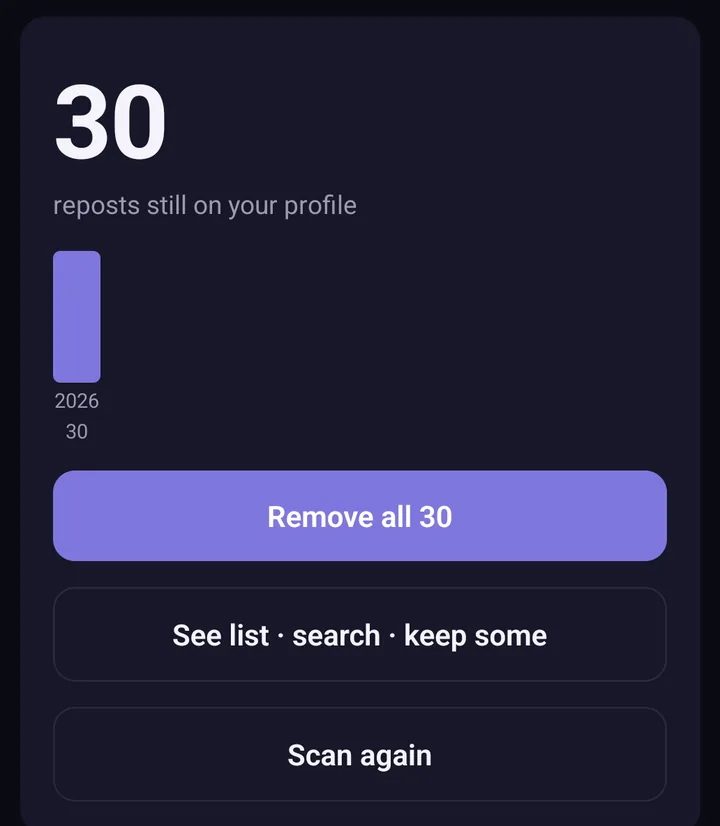
Screens from the test version of the Freshslate app. The final app may look slightly different.
Freshslate, coming soon to iPhone and Android, removes your reposts in bulk, unlikes videos in bulk and clears favorites in bulk. You can search and sort your lists by creator, caption or date, so you can find every video on the topic you're done with and lock the ones you want to keep. It works at a steady pace of about 2 seconds per video so TikTok doesn't block you, and you can pause, leave and come back. You sign in on TikTok's own page inside the app, Freshslate never sees your password, and everything stays on your phone. Want to see it first? Try the interactive demo.
Updated November 16, 2026. TikTok changes its menus from time to time; if a button has moved, tell us at [email protected].
Old likes and reposts still shape your feed
Freshslate (coming soon to iPhone and Android) clears them in bulk so your fresh start sticks.
- Remove every repost in one go, and lock the ones you want to keep
- Unlike videos and clear your favorites in bulk
- Find any video you watched in your TikTok data download
- You sign in on TikTok's own page. Your password and data stay with you