 Freshslate
How to make your TikTok account private
A private account lets you choose who can watch your videos and see your profile tabs. It takes a few taps to turn on, but it doesn't hide everything. This guide shows how to do it on every device and explains, in plain words, what really changes.
Quick answer: Open TikTok, tap Profile, tap ☰, then Settings and privacy → Privacy → Private account and turn it on. From then on, new people have to ask to follow you and wait for your OK. Only your followers can watch your videos and see your reposts. People can't Duet, Stitch, download your posts or add them to their Stories. Your existing followers keep access, your name, username and profile photo stay visible to everyone, and your account can still be found in search.
How to make your TikTok account private on iPhone
- Open the TikTok app and tap Profile in the bottom right corner.
- Tap the ☰ menu (three lines) in the top right.
- Tap Settings and privacy.
- Tap Privacy.
- Turn on Private account. In some versions you tap "Private account" and then flip a switch on the next screen.
- If TikTok shows a short message about what changes, read it and confirm.
That's it. The change is instant. You don't need to log out or restart the app.
If you can't find Privacy, scroll to the top of Settings and privacy and type "private" in the search box. TikTok moves menu items around between versions, but the search always finds it.
How to make your TikTok account private on Android
The steps are the same as on iPhone:
- Tap Profile.
- Tap ☰ in the top right.
- Tap Settings and privacy → Privacy.
- Turn on Private account.
On TikTok Lite, the menu can look simpler. Look for Profile → ☰ → Settings → Privacy. If you don't see a Private account option there, try the full TikTok app or the website. The setting is tied to your account, so turning it on anywhere turns it on everywhere.
How to make your TikTok private on a computer
- Go to tiktok.com and log in.
- Hover over or click your profile picture and choose Settings.
- Open the Privacy section.
- Turn on Private account.
The website layout changes from time to time. If you see a menu called "More" on the left side, Settings is usually inside it.
What does a private account do on TikTok?
"Private" on TikTok means one main thing: you decide who can follow you. Everything else flows from that. Here's what changes once you switch it on:
- Follow requests. When someone new taps Follow, it becomes a request. You see it in your Inbox and can approve or decline it.
- Your videos. Only approved followers can watch the videos you post. People who don't follow you see a message saying the account is private.
- Your profile tabs. Your Reposts tab is only visible to your followers. Liked videos can be set to Followers or Only you (the Everyone choice is for public accounts only).
- For You feed. Your videos won't be shown to strangers on their For You page. They mostly reach the people who already follow you.
- Sounds and hashtags. Videos from a private account generally don't show up for strangers on sound pages or hashtag pages either.
- Some features for others. TikTok says people can't Duet, Stitch, create stickers with, download your posts, or add your posts to their Stories (more below).
What does a private account on TikTok look like to others?
A stranger who finds your profile sees your profile photo, name, username, bio and your follower, following and likes counts. Where your videos would be, they see a lock and a message along the lines of "This account is private. Follow this account to see their content and likes." They'll see a button to request to follow you.
What stays public on a private TikTok account
This is where people get caught out. A private account does not hide:
- Your name, username, profile photo and bio. Anyone can find you in search and see these. Don't put your school, full name or location in your bio if you don't want strangers to know.
- Your counts. Follower, following and total likes numbers still show.
- Comments you write on other people's public videos. Those are visible to everyone who watches that video, with your name.
- Your likes on other people's videos. The creator still gets told you liked their video, and your name can show in their list of likes.
- Your existing followers. Everyone who already followed you before you switched keeps full access. More on that below.
- Stories. People you've approved see your stories. And when you view someone else's story, they can see your name, private or not.
Want to see the full picture of who sees what, including watch history, searches, drafts and profile views? Read can people see your TikTok reposts, likes and favorites.
Can people see my reposts if my account is private?
Only your approved followers can. A private account is actually the only built-in way to stop strangers from opening your Reposts tab, because TikTok has no switch that hides reposts on a public account.
Keep in mind:
- Followers still see them. If your reposts are the thing you're embarrassed about, going private doesn't hide them from people who already follow you.
- Followers' feeds. TikTok says your followers can see your reposts in their For You feed too, labeled with your photo and nickname.
- Replies. Followers who can see a repost can reply to it, and your comment settings don't apply to those replies. Removing the repost deletes its replies too.
- Old reposts are still there. Going private doesn't remove anything. If you switch back to public later, the whole Reposts tab is open again.
So if you want them gone for good, remove them. For one repost, tap Share → Delete repost, or press and hold the video → Remove repost. Full steps are in how to delete a repost on TikTok. If you have hundreds, see how to delete all reposts on TikTok. Other options are in how to hide reposts on TikTok.
What happens to your followers when you go private
Existing followers stay
TikTok doesn't remove anyone when you switch. If 300 people followed you yesterday, all 300 can still see everything today. If there's someone you don't want watching, you have to remove them yourself.
How to remove a follower
- Go to your profile and tap Followers.
- Find the person.
- Tap the three dots or the button next to their name and choose Remove (wording varies).
They won't get a notice, but they'll notice they need to request to follow you again. If you never want to hear from them, block them from their profile instead. Blocking stops them from seeing your profile and messaging you.
Approving new followers
Follow requests show in your Inbox (often under "Activity" or "Follow requests"). Tap the check to approve, or the × to decline. Declining doesn't notify them. They can request again later.
Can people who follow me see my liked videos?
If your Liked videos setting is Followers, they can. New accounts hide liked videos by default. To hide them from everyone, go to Settings and privacy → Privacy → Liked videos → Only you. Step-by-step help is in how to make TikTok liked videos private.
Duets, stitches, downloads and reposts of your videos
When your account is private, other people can't use your videos the way they can with a public account:
- Duet and Stitch: TikTok says people can't Duet or Stitch posts from a private account.
- Downloads: People can't download your posts to their phone.
- Stickers and Stories: People also can't create stickers with your posts or add them to their Stories.
- Sharing: Followers may still be able to share a link, but someone who doesn't follow you can't watch it from that link.
You can also control these one by one, even on a public account. Look in Settings and privacy → Privacy for Duet, Stitch and Downloads, or set them per video before you post under "More options". If you see different choices than these, your app version may label them differently.
Under-16 accounts: private by default
If you were under 16 when you made your account (based on the birthday you entered), TikTok sets it to private by default. TikTok also turns off or limits a few things for younger users, such as:
- Direct messages are not available for under-16 accounts.
- Duet and Stitch on your videos are off or limited.
- Downloads of your videos are off.
- Your account isn't suggested to other people by default.
- Going LIVE is for adults only.
Some of these defaults also apply in a softer way to 16 and 17 year olds. The exact rules depend on your country, and TikTok updates them. If you're a parent, Family Pairing in Settings and privacy → Family Pairing lets you link to your teen's account and help manage these settings.
You can't get around under-16 rules by changing your birthday later. TikTok doesn't let you edit it freely, and doing so breaks its rules.
Make just one video private instead
Maybe you don't want your whole account private, just one post. You can change who can see a single video, even after posting:
- Open the video on your profile.
- Tap the three dots (or the Share arrow, then look for "Privacy settings").
- Tap Privacy settings (or "Who can watch this video").
- Choose Everyone, Friends or Only me.
"Only me" hides the video from everyone but you. It stays on your profile with a lock you can see. You can make it public again the same way. This is the answer to "how to make a TikTok private after posting" and "how to make your private TikTok video public".
Private stories
Stories follow your account privacy. On a private account, only approved followers can see them. Some versions also let you pick who sees a story before you post it.
How to make your TikTok account public again
Go back to Profile → ☰ → Settings and privacy → Privacy → Private account and turn it off. When you do:
- Any waiting follow requests are usually approved automatically.
- Your videos, Reposts tab and (if open) Liked tab become visible to everyone again.
- New videos can be shown on For You to strangers again.
- Videos you set to "Only me" or "Friends" stay that way. Changing account privacy doesn't change single-video settings.
Before you go public, it's worth scrolling your Reposts and Liked tabs to make sure you're happy for anyone to see them.
Can't turn on private account?
The option is missing
Update TikTok from the App Store or Google Play. If it's still missing, use the search box in Settings and privacy and type "private". On TikTok Lite, try the full app or tiktok.com.
Business account
Business accounts can't be private. If you switched to a business account, change it back to a personal account first in Settings and privacy → Account (look for "Switch to personal account"). Note that business tools like some analytics may change when you switch.
The switch turns itself back off
Close the app fully, reopen it and try again. Check your internet connection. If it keeps happening, log out and log back in.
People can still see my videos
They probably already followed you. Remove them as a follower or block them. Also, videos that someone downloaded or screen recorded before you went private are on their phone, and TikTok can't reach those.
Should you make your TikTok private?
It depends on what you use TikTok for. Here's a simple way to decide.
Go private if
- You mostly post for friends and family, not to go viral.
- You've had strangers leave mean comments or send weird follow requests.
- Your Reposts or Liked tabs show things you don't want classmates, coworkers or family to see, and you haven't had time to clean them up yet.
- You're young, or you're setting up an account for a child.
Stay public if
- You want to grow, sell something or be found by new people. Private accounts aren't shown on strangers' For You pages, so growth slows down a lot.
- You run a business account (which can't be private anyway).
- You're happy with what's on your profile and just want to hide one or two things. In that case, set those videos to Only me and make your liked videos private instead.
A lot of people do both: go private for a few days, clean up their profile, then go public again.
Other settings to change with a private account
Private account covers who can see your videos. A few other settings decide who can reach you. While you're in Settings and privacy → Privacy, check these:
- Direct messages: choose who can message you, such as friends only or no one.
- Comments: choose who can comment on your videos (everyone, friends, or no one), and turn on comment filters to hide words you don't want to see.
- Mentions and tags: limit who can mention or tag you.
- Suggest your account to others: turn off suggestions to contacts, Facebook friends and people with mutual connections if you don't want to be recommended.
- Following list: set to Only me if you don't want followers to see who you follow.
- Activity status: turn off if you don't want friends to see when you're online.
- Profile views: turn off if you don't want people to see you visited their profile.
Names and where they sit change between app versions. If one isn't where you expect, use the search box at the top of Settings and privacy.
"Private account viewer": can you see a private TikTok?
People search "TikTok private account viewer" and "how to see a private TikTok account" a lot. The honest answer: you can't. The only way to see a private account's videos is to send a follow request and be approved.
Sites and apps that claim to show private TikTok accounts don't work. TikTok doesn't share private videos with anyone outside the approved followers. Those tools usually just want you to fill in surveys, install something, or type in your login, which can get your own account stolen. Don't use them.
The flip side is good news if you're the one going private: other people can't use some trick to see your videos either. The main ways your private content still gets out are approved followers who screenshot or record it, or someone using your phone.
Private vs public TikTok at a glance
| Thing | Public account | Private account |
|---|---|---|
| Who can follow you | Anyone, instantly | Only people you approve |
| Who can watch your videos | Anyone | Approved followers |
| Reposts tab | Anyone | Approved followers |
| Liked videos tab (hidden by default) | Everyone, if you choose it | Followers, if you choose it |
| Name, photo, bio, counts | Everyone | Everyone |
| Your comments on others' public videos | Everyone | Everyone |
| Shown on strangers' For You | Yes | No |
| Duet / Stitch by others | Depends on your settings | Not allowed |
| Downloads by others | Depends on your settings | Not allowed |
| Stickers or adding to Stories by others | Allowed | Not allowed |
| Found in search | Yes | Yes |
| Existing followers | Keep access | Keep access |
Questions people ask
How do I make my TikTok account private?
Profile → ☰ → Settings and privacy → Privacy → turn on Private account.
What does a private account do on TikTok?
It means only people you approve can follow you and watch your videos. Strangers only see your name, photo, bio and counts.
What does a private account on TikTok mean for my followers?
Nothing changes for people who already follow you. They keep seeing everything.
Can people see my reposts if my account is private?
Only your followers can, on your profile and in their For You feed.
Can people see my likes if I'm private?
Your followers can if your Liked videos setting is Followers. Set it to Only you to hide it from everyone.
Can people still find me if my TikTok is private?
Yes. Your name and username still appear in search. They just can't watch your videos without being approved.
How do I make my TikTok private to everyone?
Turn on Private account, remove any followers you don't want, set your liked videos to Only you, and hide your following list. To hide a single video from everyone, set it to Only me.
Can I make a TikTok private after posting?
Yes. Open the video, tap the three dots, tap Privacy settings and choose Only me or Friends.
Does a private account hide my comments?
No. Comments on other people's public videos are still visible.
Can someone repost my video if I'm private?
Approved followers may see a repost option depending on the version, but anyone who isn't approved still can't watch your video.
Why is my TikTok private by default?
Accounts for users under 16 are set to private by default.
Can I make my TikTok account private on a business account?
No. Switch back to a personal account first.
Does going private delete my followers?
No. You keep all your followers.
Is there a TikTok private account viewer?
No real one. Private videos are only shown to approved followers. Sites that claim otherwise don't work and can be risky.
Will my views go down if I go private?
Usually yes, because your videos stop being shown to strangers on For You.
Can you make a TikTok account not private?
Yes. Go back to Privacy and turn Private account off. Waiting follow requests are usually approved when you do.
How does a private account work on TikTok with friends?
Friends are people you follow who follow you back. On a private account they still need to be approved followers. Once they are, they see everything your other followers see, plus videos you set to Friends.
Can I see who requested to follow me?
Yes. Follow requests appear in your Inbox. You can approve or decline each one, and the person isn't told if you decline.
Does making my account private hide my favorites?
Favorites are already private by default, whether your account is public or private. Check the lock icon on the bookmark tab to be sure.
Does a private account stop people from screenshotting my videos?
No. Approved followers can still screenshot or screen record. Only approve people you trust.
Faster: tidy your profile with Freshslate (coming soon)
Going private stops strangers, but your followers still see years of reposts and maybe your likes. Freshslate, coming soon to iPhone and Android, helps you clean that up. It scans your reposts, shows them by year, lets you lock the ones you want to keep, and removes the rest about every 2 seconds so TikTok doesn't block you. It can also unlike videos and clear favorites in bulk, and its Privacy Checkup walks you through who can see your reposts, likes, favorites and following list.
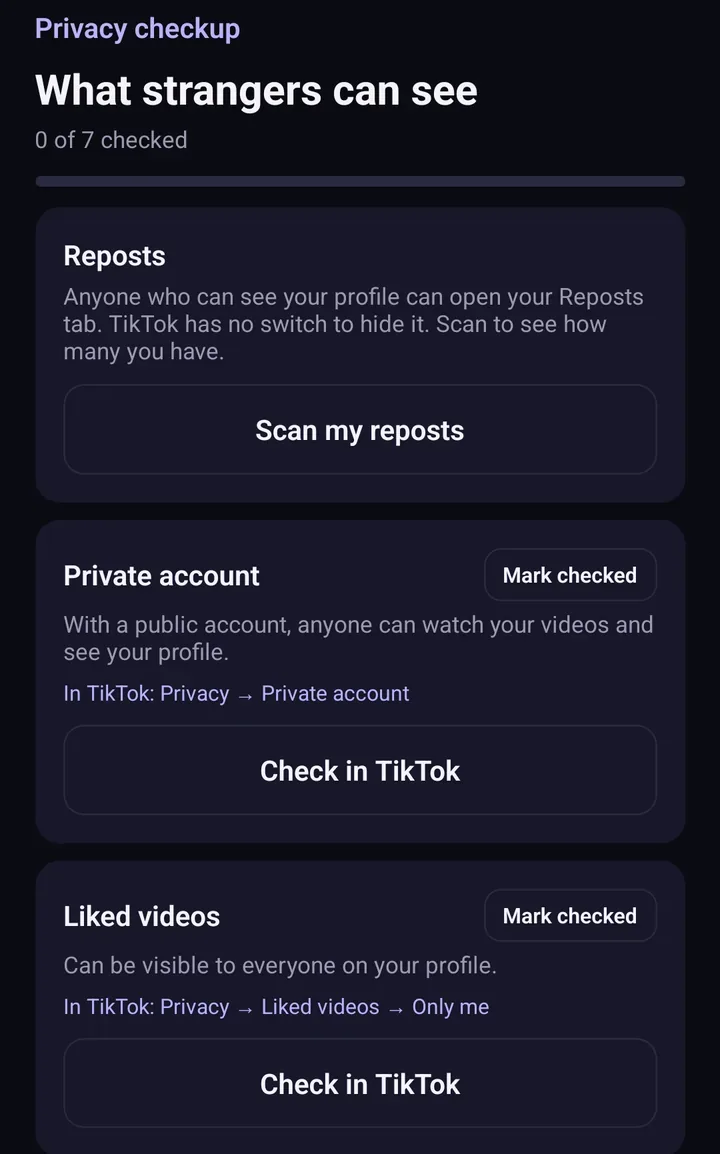
Screens from the test version of the Freshslate app. The final app may look slightly different.
You sign in on TikTok's own page inside the app, so Freshslate never sees your password, and your data stays on your phone. Try the interactive demo to see how it works.
Updated November 16, 2026. TikTok changes its menus from time to time; if a button has moved, tell us at [email protected].
Going private? Clean up your profile too
Freshslate removes old reposts, likes and favorites in bulk, so your approved followers only see what you want.
- Remove every repost in one go, and lock the ones you want to keep
- Unlike videos and clear your favorites in bulk
- Find any video you watched in your TikTok data download
- You sign in on TikTok's own page. Your password and data stay with you