 Freshslate
How to make liked videos private on TikTok
Every heart you tap on TikTok lands in a Liked list on your profile. This guide shows you how to lock that list so only you can see it, how to check who can see it right now, and how to unlike one video or a whole pile of them.
Quick answer: Open your profile, tap ☰ in the top corner, then go to Settings and privacy → Privacy → Liked videos and pick Only you. Your Liked tab (the heart icon on your profile) now shows a lock, and other people can't open it. TikTok hides liked videos by default when you create an account, so yours may already be set this way. This hides the list. It does not remove your likes. To remove them, you have to unlike each video, because TikTok has no "unlike all" button.
What "private liked videos" really means
When people search "how to make your likes private on TikTok" or "hide liked videos TikTok," they usually mean one of two different things. It helps to know which one you want before you start tapping.
- Hide the list. You still like videos, and the hearts still count, but nobody can scroll through your Liked tab to see what you've been watching. This is one setting and it takes about ten seconds.
- Get rid of the likes. You want the hearts gone, so the videos no longer sit in your Liked list at all. This means unliking each video, one at a time, unless you use a tool that does it for you.
Most people want the first one. If you're worried a friend, a parent, a classmate or a coworker can see what you've been liking, the privacy switch fixes that. If you want a fresh start, or your Liked list has thousands of videos you'd rather not keep, you'll want to unlike them too. Both are covered below.
One thing to know up front: making the list private does not hide the fact that you liked a single video from that video's creator. A creator can still see that their video got a like, and in many cases your name shows up in their notifications. The privacy setting is about your profile's Liked tab, not about each heart you tap. More on that in who can see your likes.
Make liked videos private on iPhone and Android
The steps are the same on iPhone and Android. The buttons might sit in slightly different spots, but the words are the same.
- Open the TikTok app and tap Profile in the bottom right corner.
- Tap the ☰ menu (three lines) in the top right corner.
- Tap Settings and privacy.
- Tap Privacy.
- Scroll down and tap Liked videos.
- Pick Only you.
That's it. There's no save button. The change takes effect right away. Full path: Profile → ☰ → Settings and privacy → Privacy → Liked videos → Only you.
If you later want people to see your likes again (some people search "how to make your likes not private on TikTok"), go to the same spot and pick a different option. TikTok lists three: Everyone (public accounts only), Followers (private accounts only) and Only you. Pick the one that matches who you want to see the list.
Tip: While you're on the Privacy screen, look at the settings just above and below Liked videos. In most versions you'll also find Favorite videos, Following list and other profile settings there. It's worth checking all of them in one go. Our guide can people see your TikTok reposts, likes and favorites walks through each one.
How to make your liked videos private on TikTok on iPhone
On iPhone, the ☰ menu is in the top right of your profile. If you have an older iPhone with a small screen, you might need to scroll a little on the Privacy page to reach Liked videos. If the app looks very different from what's described here, update it from the App Store first. Old versions of TikTok sometimes put this under a menu called "Privacy and safety" instead of "Privacy."
On Android
Android works the same way. If you use TikTok Lite, the menus are simpler and some privacy settings may be missing or named differently. If you can't find Liked videos in TikTok Lite, open your account in the full TikTok app or on the website once, change the setting there, and it will apply to your whole account. The setting belongs to your account, not to the phone, so you only need to change it once.
Make liked videos private on PC, laptop or the website
A lot of people search "how to make liked videos private on TikTok PC" or "on laptop." You can usually do it on tiktok.com in a browser too.
- Go to tiktok.com and log in.
- Click your profile picture, then click Settings (in some layouts it's under a "More" menu on the left side).
- Click Privacy.
- Find Liked videos and set it to Only you.
The website changes from time to time, so the labels may be slightly different. If you don't see Liked videos in the website settings, change it in the phone app instead. Whatever you pick in one place applies everywhere: on your phone, on the website and on any other device you log in on.
On the TikTok desktop app for Windows or Mac, the settings usually mirror the website. Look for your profile picture, then Settings, then Privacy.
How to check that your likes are hidden
After you change the setting, it's smart to double-check it worked. Here are three easy ways:
- Look for the lock. Go to your profile and look at the row of tabs under your bio. The Liked tab (heart icon) should now show a small lock or a crossed-out eye, depending on your app version. That means it's private.
- Look at the setting again. Go back to Settings and privacy → Privacy → Liked videos and make sure it still says Only you. Sometimes a tap doesn't register on a slow connection.
- Ask a friend. Have someone open your profile on their phone and tap your heart tab. They should see a message saying your liked videos are private, or not see the tab at all.
You will still see your own Liked tab, with all your videos in it. That's normal. "Only you" means just you, so your list doesn't disappear for you. It only disappears for everyone else.
Who can see your likes (and what they can't see)
"Can people see your liked videos on TikTok?" is one of the most searched questions about TikTok privacy. Here's the honest answer in plain words.
Your Liked tab
If your Liked videos setting is Everyone (only possible on a public account), anyone who can see your profile can tap your heart tab and scroll through every video you've liked. If it's Followers (private accounts), only your followers can. If it's Only you, nobody else can open the list. New accounts start on hidden.
If your account is private
People search "can people see your liked videos on TikTok if your account is private." A private account means only followers you approve can see your profile, videos and likes. On a private account, the Liked videos choices are Followers or Only you. With Followers, only your followers can open your Liked tab. Strangers can't. If you want even your followers kept out, pick Only you. See how to make your TikTok account private for the full steps.
The creator of each video
This is the part most people miss. When you like someone's video, the creator usually gets a notification, and they can often see a list of who liked it. Your Liked videos setting does not change this. So if you like your crush's video, they may well see your name in their activity, even with your Liked tab locked. The only way to undo that is to unlike the video. Even then, they may have already seen the notification.
People who can't see your likes at all
Nobody can see the exact time you liked something, the order you liked things in (other than the order shown in your own list), or how long you watched. There's no "who viewed my likes" feature. If an app or website claims it can show you someone's hidden likes or a private account's activity, don't trust it. Those tools can't see private settings, and many of them are scams that try to steal your login.
New account? TikTok says liked videos are hidden from your profile by default when you create an account. If you made your account a while ago, or changed this setting before, check it anyway.
Why can't I make my liked videos private?
People type "why can't I make my liked videos private on TikTok" when the setting is missing or won't stick. Here are the real causes and what to do about each one.
- Your app is out of date. Old versions put the setting somewhere else or don't show it. Update TikTok from the App Store or Google Play, close it fully, and open it again.
- You're looking in the wrong menu. Liked videos sits under Privacy, not under Account or Content preferences. Scroll all the way down the Privacy page. It's often under a heading about who can see your profile or interactions.
- You're on TikTok Lite. Lite has fewer settings. Use the full app or tiktok.com once to change it.
- It's already private. Liked videos are hidden by default on new accounts, so the setting may already be on Only you and nothing seems to change. Check for the lock on your heart tab.
- The Liked tab doesn't show on your profile. Where the tab shows and how it looks can differ by version. If your tab is gone, your likes are probably not visible to others anyway, but check the setting to be sure. You can still find them through your settings or your data file (see finding a video you liked).
- The change didn't save. A weak connection can make a setting flip back. Turn on Wi-Fi or mobile data, change it again, then close and reopen the app to check.
- You have two accounts. If you switch between accounts, the setting is per account. Make sure you changed it on the one you meant to.
If none of that works, log out and log back in, then try again. As a last step, use Settings and privacy → Report a problem (in some versions it sits under Support) to tell TikTok the setting is missing.
How to unlike one video
If there are just a few likes you'd rather not have, removing them one by one is quick.
From your Liked tab
- Go to your profile and tap the heart tab (the Liked tab).
- Tap the video you want to unlike so it opens full screen.
- Tap the red heart on the right side of the screen. It turns white (or gray), and the like count goes down by one.
The video may stay in your Liked tab until you leave and come back, or pull down to refresh. That's normal. Once the list reloads, it's gone.
From the video itself
If you come across a video you liked while scrolling, just tap the red heart once. Be careful: double-tapping the screen adds a like. To unlike, tap the heart icon itself.
On the website
On tiktok.com, open your profile, click the Liked tab, click a video, then click the red heart next to it. It works the same as the app.
Does the creator know if you unlike? TikTok doesn't appear to send a "this person unliked your video" alert. But if they already saw your like in their notifications, unliking won't erase what they saw. The like just stops counting.
How to delete all liked videos on TikTok
This is where it gets slow. Searches like "unlike all TikTok videos at once," "how to remove all liked videos on TikTok at once iPhone" and "is there a way to delete all your liked videos on TikTok" all lead to the same truth: TikTok has no "unlike all" button. There's no setting, no hidden menu and no secret gesture that clears your whole Liked list in one tap. Many Reddit threads ask the same thing, and the answer there is the same.
So you have three real options.
Option 1: Unlike them by hand, fast
This is the free, built-in way. It works best if you have a few dozen or a few hundred likes.
- Go to your profile and open the heart tab.
- Tap the very first video (top left) so it opens full screen.
- Tap the red heart to unlike it.
- Swipe up to go to the next liked video.
- Tap the heart again. Keep going: tap, swipe, tap, swipe.
With practice, you can unlike a video every couple of seconds. A thousand likes still takes a long time, though, so plan to do it in batches.
Slow down a little. TikTok's Help Center says that if you like videos too quickly, you may get an alert, and you should wait 24 hours before trying again. Unliking in a fast burst can run into limits too. Take short breaks, and if you see an alert, stop and wait 24 hours before you carry on.
Option 2: Hide the list instead
If your real goal is "I don't want anyone to see these," you may not need to unlike anything. Set Liked videos to Only you, as shown above, and you're done. Your list stays for you to look back on, and nobody else can see it.
Option 3: Use a tool built for bulk unliking
If you've liked thousands of videos, doing it by hand can take hours. That's why people search "unlike all TikTok videos extension." Be careful with browser extensions and random apps. Some ask for your TikTok password, which you should never give to anyone outside TikTok. Others tap too fast and get your account limited.
Freshslate, our app, is built for this job and is coming soon to iPhone and Android. You sign in on TikTok's own login page inside the app, so Freshslate never sees your password. It scans your Liked list, lets you search and sort it by creator, caption or date, lets you lock the ones you want to keep, and then unlikes the rest at a steady pace of about 2 seconds each, so TikTok doesn't block you. You can pause, leave and come back later. There are no Freshslate servers; your list stays on your phone.
Does deleting your account remove your likes?
If you permanently delete your TikTok account, your likes go with it. But that also deletes your videos, followers, drafts and everything else. It's a big step just to clear likes. If you only want a fresh start on your feed, see how to reset your TikTok For You page instead.
Why does TikTok unlike videos I've liked?
This question shows up in Google Trends next to "TikTok liked videos," so it's clearly bugging a lot of people. You know you liked a video, and now the heart is white again, or the video is missing from your Liked tab. TikTok hasn't published one official explanation, but here are the common reasons and how to tell which one hit you.
- The video was deleted or made private. If the creator deletes the video, makes it private, or makes their account private, it drops out of your Liked list. Your like didn't vanish because of you; the video did. This is the most common cause.
- The video was taken down. If TikTok removes a video for breaking its rules or for a copyright claim (often over the music), it leaves everyone's Liked lists. Sometimes the video comes back with the sound muted, and the like may or may not come back with it.
- You blocked the creator, or they blocked you. Blocking hides each other's content, so their videos stop showing in your Liked tab.
- The like didn't save. If you tapped the heart while your connection dropped, the heart may have turned red on your screen but never reached TikTok. When the app reloads, it shows the real state: not liked.
- You tapped the heart twice. Tapping the heart icon once likes, tapping it again unlikes. It's easy to do this by accident when you're scrolling fast.
- You're on a different account. If you have more than one account, check which one you're logged into. Likes belong to the account, not the phone.
- A glitch or update. After some app updates, people report likes looking wrong for a while. Close the app fully, update it, and check again later.
- Someone else is using your account, or an app you connected. If lots of likes vanish at once and you didn't do it, check the security section of Settings and privacy (called Security or Security and permissions, depending on your version) for devices you don't recognize, log out of them, and change your password. Also think about whether you ever gave your login to a "cleanup" or "followers" tool.
If the video still exists and you want the like back, open it and tap the heart again. If it's missing, the creator probably removed it, and there's no way to bring it back on your end.
How to find a video you liked
Sometimes the problem is the opposite: you want to find a video, not remove it. Here's how to dig one up.
Scroll your Liked tab
Open your profile and tap the heart tab. Your most recent likes are at the top. If you remember roughly when you liked it, scroll down until you get to that time. This gets slow if you've liked thousands of videos, because TikTok has no search box inside the Liked tab in most versions.
Check your watch history
If you liked it recently, it may also be in your watch history, which in most versions seems to cover about the last 180 days. In many versions it's at Profile → ☰ → Settings and privacy → Activity center → Watch history, but the spot changes between updates. Our guide on TikTok watch history covers where to find it if it's missing.
Use your TikTok data file
Your TikTok data download usually includes a list of the videos you've liked, with the date and a link. This is the best way to find an old like, or one that's buried under thousands of others.
- Request your data: Settings and privacy → Account → Download your data. Choose JSON and make sure Activity is ticked. Our guide to downloading your TikTok data has every step.
- Wait for TikTok to prepare it (TikTok says it may take a few days), then download the ZIP from the Download data tab. It's only there for up to 4 days.
- Open it in our free watch history viewer. It reads the file in your browser only, and nothing gets uploaded. You can scroll your likes by day and tap through to the videos.
The file is also handy if you want to see "remove liked video history" in one place. It shows you everything you've liked, so you can decide what to unlike. Note that the file is a snapshot: unliking a video in the app won't change a file you already downloaded. Also, TikTok says the last 24 to 48 hours of some data may not be in it yet.
Likes, favorites and reposts side by side
People often mix these three up. Each one is a separate list with its own privacy rules.
| Thing | What you tap | Where it shows on your profile | Can you hide the tab? | Remove all at once in TikTok? |
|---|---|---|---|---|
| Like | Heart | Liked tab (heart icon) | Yes: Privacy → Liked videos → Only you (hidden by default on new accounts) | No |
| Favorite | Bookmark | Favorites tab (bookmark icon) | Yes: private by default in most versions | No |
| Repost | Share → Repost | Reposts tab (two arrows) | No switch: only a private account limits it | No |
So "how to make your likes and favorites private on TikTok" is really two settings, both on the same Privacy page. For favorites, see how to remove TikTok favorites. For reposts, which can't be hidden with a switch, see how to hide reposts on TikTok and how to delete all reposts on TikTok.
Questions people ask
Can I make my liked videos private on TikTok?
Yes. Go to Profile → ☰ → Settings and privacy → Privacy → Liked videos and pick Only you. Your Liked tab gets a lock, and only you can open it.
How do I make my likes private on TikTok in 2026?
The steps haven't changed much since 2025. It's still under Settings and privacy → Privacy → Liked videos. If the app looks different, update it first.
How do I hide liked videos on TikTok on PC?
On tiktok.com, click your profile picture, open Settings, then Privacy, and set Liked videos to Only you. If it's not there on the website, change it in the phone app. The setting applies everywhere.
Can people see your liked videos on TikTok?
Only if you've chosen to show them. Liked videos are hidden by default on new accounts. With Everyone (public accounts), anyone who can see your profile can open your heart tab. With Followers (private accounts), only your followers can. With Only you, nobody else can.
Are TikTok likes public by default?
No. TikTok says liked videos are hidden from your profile by default when you create an account. They only show if you change the setting.
Can people see your liked videos if your account is private?
Only your followers can, and only if your Liked videos setting is Followers. On a private account the choices are Followers or Only you. Strangers can't see your likes on a private profile.
Can the person whose video I liked see that I liked it?
Usually yes. Creators get notifications about likes and can see who liked their videos. Locking your Liked tab doesn't change this.
Does hiding my liked videos also hide my favorites?
No. Favorites have their own setting on the same Privacy page. In most versions your Favorites tab is already private by default.
Is there a way to delete all your liked videos on TikTok at once?
Not inside TikTok. You have to unlike them one by one, or use a bulk tool. Freshslate (coming soon) will do it at a safe pace while you keep the ones you want.
How do I unlike all TikTok videos without getting blocked?
Go at a steady pace and take breaks. TikTok says liking too fast can trigger an alert, and you should then wait 24 hours. About one unlike every couple of seconds is safer than a fast burst.
Why does TikTok unlike videos I've liked?
Usually the video was deleted, made private or taken down, or the like never saved because of a bad connection. Less often it's a glitch, a blocked account, or someone else using your login.
Why did my liked videos disappear?
If one or two vanished, the creators likely removed them. If your whole Liked tab is gone, check that you're on the right account and update the app. In some versions the tab is hidden from your profile but your likes still exist in your data file.
Does unliking a video notify the creator?
Not as far as anyone can tell. There's no "unliked" alert. The like count just drops by one.
Can I make some liked videos private and others public?
No. The setting covers your whole Liked list. Whoever can see it sees all of it. If you want some gone, unlike them.
Does liking a video affect my For You page?
Yes. Likes are one of the signals TikTok uses to pick videos for you. Unliking a lot of videos in one topic can help shift your feed, along with "Not interested."
How do I make my liked videos public again?
Go to the same Liked videos setting and pick Everyone (public accounts) or Followers (private accounts). The lock on your heart tab goes away.
Will my likes come back if I re-download TikTok?
Your likes are saved to your account, not the app, so deleting and reinstalling TikTok doesn't remove them. Log back in and your Liked tab is still there.
Faster: unlike in bulk with Freshslate (coming soon)
Hiding your Liked tab takes one setting. Clearing it out takes a lot of tapping, because TikTok won't do it for you. Freshslate, coming soon to iPhone and Android, scans your Liked list, lets you search it and lock the videos you want to keep, then unlikes the rest at a steady pace so your account stays safe. Its Privacy Checkup also walks you through who can see your likes, favorites, reposts and following list, all in one place. Want to see how it works first? Try the interactive demo on a sample profile.
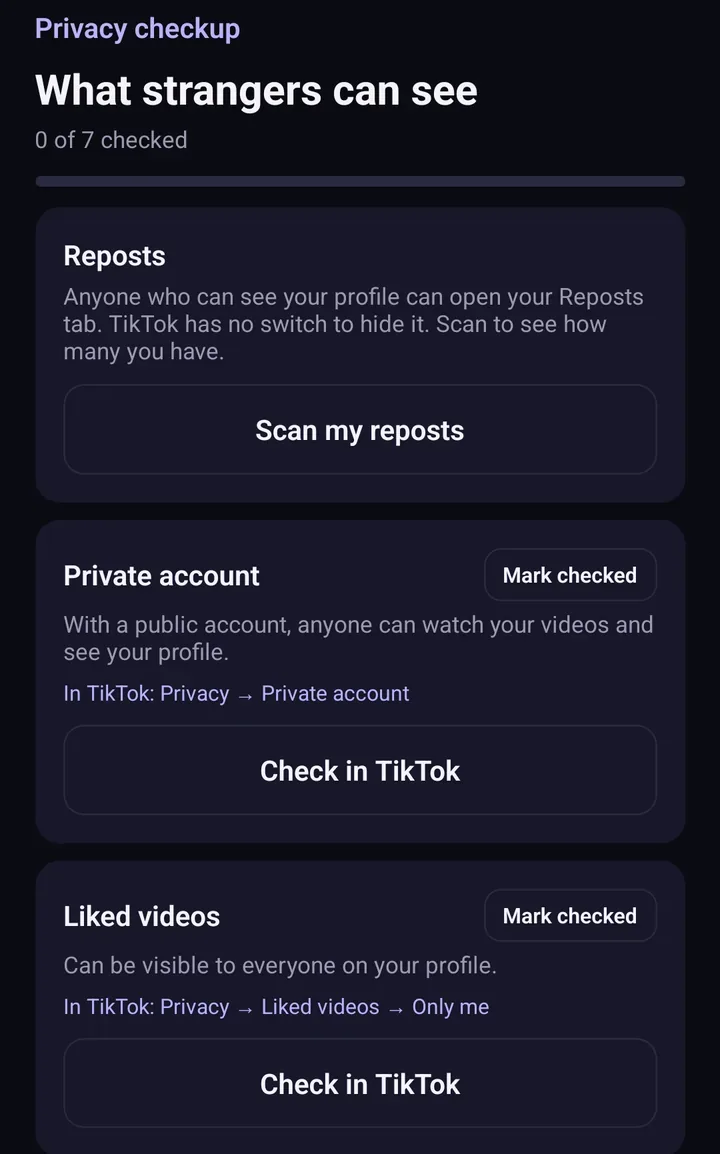
Screens from the test version of the Freshslate app. The final app may look slightly different.
Updated November 16, 2026. TikTok changes its menus from time to time; if a button has moved, tell us at [email protected].
Unlike hundreds of TikToks without tapping each one
Freshslate (coming soon to iPhone and Android) scans your Liked list so you can keep the ones you want and unlike the rest.
- Remove every repost in one go, and lock the ones you want to keep
- Unlike videos and clear your favorites in bulk
- Find any video you watched in your TikTok data download
- You sign in on TikTok's own page. Your password and data stay with you