 Freshslate
How to delete all reposts on TikTok at once
You reposted hundreds of videos and now you want them gone. TikTok doesn't make that easy. This guide shows the fastest way to clear them by hand on iPhone, Android and a computer, why the "instant" tricks often backfire, and what a safer bulk option looks like.
Quick answer: TikTok has no "remove all reposts" button in 2026. The only built-in way is one video at a time: open your profile, tap the Reposts tab (two arrows), open a video, tap the Share arrow, tap Delete repost (some versions say Remove repost), then swipe up to the next one and repeat. Pressing and holding the video and tapping Remove repost works too. Any replies on a repost are deleted along with it. With practice that takes about 3 to 5 seconds per video. For hundreds or thousands of reposts, use a tool that removes them one by one at a slow, steady pace so TikTok doesn't block you.
Is there a way to delete all reposts on TikTok at once?
No, not inside TikTok. There is no "select all", no "clear reposts" button and no setting that wipes your Reposts tab. People search for this every day ("can you delete all reposts on TikTok with one click", "is it possible to delete all TikTok reposts at once"), and the honest answer is the same on iPhone, Android, TikTok Lite and the website: TikTok only lets you remove reposts one at a time.
There's also no switch to hide the Reposts tab from your profile. If your account is public, anyone can open that tab and scroll through everything you've reposted. If your account is private, only your followers can see your reposts, both on your profile and in their For You feed. That's why so many people want to clear the whole tab instead of just a few videos. If you only want to hide them for now, see how to hide reposts on TikTok.
So when you see a video titled "delete all reposts in one go", it's almost always one of three things:
- The normal one-by-one method, just done quickly (sped-up video).
- A browser extension or script that clicks the button for you on tiktok.com.
- A separate app or service that does the clicking for you.
The first is safe but slow. The other two can work, but how safe they are depends on how fast they go and what they ask you for. We'll cover all three.
First: how many reposts do you have?
Before you pick a method, get a rough count. It changes what makes sense.
- Under 50 reposts: just do it by hand. It'll take you five minutes.
- 50 to 300: still doable by hand in one or two sittings if you use the swipe method below.
- 300 to 1,000: by hand is possible but tiring, and you're more likely to hit a TikTok "slow down" message if you rush.
- 1,000+: this is where a paced bulk tool saves real time. Doing it by hand means hours of the same three taps.
TikTok doesn't show a number on the Reposts tab. To guess, open the tab and scroll down for a few seconds. Each row shows three videos. If you scroll for a long time and keep loading more, you probably have hundreds. Videos you reposted years ago are at the bottom, so a long scroll also tells you how far back it goes.
Tip: If you have your TikTok data file, it can also give you a clue about how active you've been. Our free TikTok stats page reads that file in your browser and shows your busiest days and how many videos you watch a day.
The fastest manual method on iPhone
The trick is to stay inside the video player. Don't go back to the grid after each removal. TikTok lets you swipe through your reposts like a feed, so you can remove one, swipe, remove the next.
- Open TikTok and tap Profile in the bottom right.
- Tap the Reposts tab. It's the icon with two arrows, next to your videos grid and the heart or lock tabs.
- Tap the first video in the top-left corner. It opens full screen.
- Tap the Share arrow on the right side (on some versions the share area shows that you reposted it).
- Tap Delete repost in the share sheet (in some versions it says Remove repost). You may see a small message that it was removed.
- Swipe up to go to the next reposted video. Repeat steps 4 and 5.
Once your thumb learns where the buttons are, each video takes a few seconds. Many people get through 100 reposts in 6 to 10 minutes this way.
On iPhone, if you can't spot the button, swipe left along the top row of the share sheet. Where it sits changes between versions. You can also skip the share sheet: press and hold the video and tap Remove repost, or tap your profile photo at the bottom of the video and tap Remove. Some people find press and hold faster.
If you swipe up and the same video plays again, the list may not have refreshed. Go back to your profile, pull down to refresh, and start from the first video again.
The fastest manual method on Android
It's the same flow, with a few small differences in where things sit on the screen.
- Open TikTok and tap Profile.
- Tap the Reposts tab (two arrows).
- Open the top-left video.
- Tap the Share arrow, or the button that shows you reposted it.
- Tap Delete repost (or Remove repost, depending on your version). Pressing and holding the video and tapping Remove repost does the same thing.
- Swipe up for the next video and repeat.
On some Android phones the share sheet opens higher or lower depending on screen size. If you keep missing the button, slow down for the first ten and let your thumb find the spot.
If you're on TikTok Lite, the Reposts tab and the option to remove a repost may look different or be missing in your region. If you can't find them, the full TikTok app or the website usually has them.
Deleting reposts on a laptop or PC (tiktok.com)
Lots of people search "how to delete all reposts on TikTok on laptop" because a bigger screen and a mouse feel faster. It can be, but the website changes often.
- Go to tiktok.com and log in.
- Click your profile picture and open your profile.
- Click the Reposts tab. If you don't see it, your version of the site may not show it; try the app.
- Click a video to open it.
- Click the Share or repost button and choose Delete repost or Remove repost, whichever you see.
- Use the down arrow on the right (or your keyboard's down arrow) to move to the next video.
On a computer, the click path can be faster than tapping. But this is also where browser extensions and scripts live, and where people most often run into TikTok's limits. More on that below.
Tips to go faster without mistakes
These come from people who've cleared thousands of reposts by hand:
- Start from the top of the Reposts tab. Newer reposts are first. Removing from the top means the list keeps shifting up, and you never lose your place.
- Mute the sound. Every video starts playing as you swipe. Turning your phone's volume off keeps you focused and makes it less tiring.
- Use Wi-Fi. Each video loads before the button works. A slow connection adds a second or two per video, which adds up to minutes.
- Do it in batches. 50 to 100, then take a break. Long nonstop runs are when you start mis-tapping, and they're also more likely to trigger a slow-down warning.
- Don't re-check each one. Trust the "removed" message. You can scroll the tab at the end to see what's left.
- Close other apps. On older phones, TikTok can lag when memory is low, and the share sheet opens slower.
- Update TikTok. Old versions sometimes put the button in a different place or don't refresh the list.
If you only need to remove one video and you aren't sure where to start, the shorter guide how to delete a repost on TikTok walks through a single removal step by step, including all three ways to do it. If you reposted something by mistake a moment ago, undoing a repost is even quicker.
Why going too fast gets you blocked
TikTok watches for behavior that looks like a bot. A real person removes a repost every few seconds at most. A script can try to remove dozens per second. When TikTok sees lots of the same action in a very short time, it may:
- Show a message like "You're tapping too fast" or "Too many attempts, try again later".
- Quietly stop removing reposts. The button seems to work, but the video comes back after you refresh.
- Log you out or ask you to verify your account.
- In worse cases, limit some features for a while.
TikTok doesn't publish the exact numbers, and they likely change. That's why nobody can honestly promise "remove 5,000 reposts in 30 seconds, totally safe." What we do know from people's reports is that steady, human-like speed is far less likely to cause trouble than bursts.
The same thing happens even by hand. People who swipe and tap nonstop for an hour sometimes see a warning. If you get one, stop, wait an hour or more, and start again at a slower pace. It's usually temporary.
A removed repost that "comes back" after refresh is a strong sign you hit a limit. Stop for a while. Pressing the button again and again right away usually makes it worse.
Browser extensions, scripts and "one click" tools
Search "remove all reposts TikTok chrome extension", "delete all repost TikTok github" or "TikTok repost remover" and you'll find plenty. We don't name or link any of them, and here's why you should think twice before installing one:
- Speed. Many are built to go as fast as possible. That's exactly what trips TikTok's limits. Some work for the first few hundred and then silently stop.
- Access to your account. A browser extension that works on tiktok.com can usually read and change anything on that page while you're logged in. That includes your messages and account settings, not just reposts. Read what permissions it asks for.
- Login requests. Never type your TikTok password into a website or app that isn't TikTok's own login page. If a tool asks for your password in its own box, that's a red flag.
- Scripts you paste into the browser console. Code from a forum or code site can do anything your logged-in browser can do. If you can't read and understand it, don't run it.
- They break. TikTok updates its website often. Many tools stop working after an update and leave you halfway done.
- TikTok's rules. TikTok's terms don't welcome automated activity. A slow tool is less likely to be flagged, but no outside tool can guarantee anything.
We're not saying every tool is bad. We're saying the risk comes from speed and from where your password goes. Judge any option on those two things.
What a safe bulk method looks like
If you're going to use any tool to remove reposts in bulk, here's what to look for:
- You sign in on TikTok's own page. The tool should open TikTok's real login screen. It should never ask you to type your password into its own form.
- It shows you everything first. You should see your reposts before anything is deleted, so you can check you have the right account and the right videos.
- You can keep some. Most people want to keep a few favorites. A good tool lets you mark them so they're skipped.
- It goes slowly on purpose. One removal every couple of seconds looks like a person. It's slower than "instant", but it finishes the job instead of getting cut off.
- You can pause and come back. Thousands of reposts take a while at a safe pace. You should be able to stop and pick up where you left off.
- It doesn't send your data to its own servers. Your list of reposts says a lot about you. It's better when it stays on your device.
At about 2 seconds per repost, 500 reposts take roughly 17 minutes and 2,000 reposts take a bit over an hour. That's slower than a script claims, but it's hands-off. You can put your phone down while it works.
It stopped working: common problems
The Remove repost button isn't there
Sometimes you're looking at the video from somewhere else (For You, search) and the app hasn't loaded your repost status yet. Open the video from your own Reposts tab. Remember the Share menu may call it Delete repost, not Remove repost. You can also press and hold the video and look for Remove repost there. If it's still missing, update TikTok, or try tiktok.com.
I removed a repost but it's still on my profile
Pull down on your profile to refresh, or close and reopen the app. If it's still there after a refresh, you may have hit a temporary limit. Wait and try again later.
"You're tapping too fast" or "Try again later"
That's TikTok's limit. Stop for at least an hour. When you come back, go slower: a few seconds per video, and take breaks every 50 or so.
Some reposts won't open or show "Video unavailable"
The creator deleted the video, made it private, or blocked you. These often still sit in your Reposts tab as gray or blank tiles. Try tapping and long-pressing them. If TikTok gives no option, they often vanish on their own over time. They can't be watched by anyone, so they're not a privacy problem.
The Reposts tab is empty but my friends still see a repost
Your friends' apps may show a cached version. It usually clears within a day. If it doesn't, ask them to refresh their feed.
The Reposts tab disappeared
The tab only appears when you have at least one repost, in most versions. If you've removed them all, it's gone. Congratulations, you're done.
I can't find the Reposts tab at all
Update the app. On TikTok Lite or in some regions it may not show. You can also check your Reposts on tiktok.com.
Keep some reposts, delete the rest
A lot of people search "how to delete all reposts on TikTok without deleting" the ones they care about. By hand, the best way is:
- Before you start, write down or screenshot the 5 to 20 reposts you want to keep.
- Go through the tab from the top and skip those as you swipe.
- If you're worried about losing one, tap the bookmark icon (Favorites) on it first. That saves it privately in your Favorites, even if you remove the repost. Favorites are private by default.
Removing a repost doesn't delete the original video, and TikTok doesn't appear to tell the creator. It takes the video off your Reposts tab and out of your friends' feeds, and it deletes any replies people left on your repost. You can repost it again later if you change your mind.
If you can't delete them all yet
If you don't have time to clear everything today, you can limit who sees them in the meantime:
- Switch your account to private. Only your followers can see your reposts, on your profile and in their For You feed. You approve who follows you. See how to make your TikTok account private for what else changes.
- Remove the newest first. The top of the tab is what visitors see first. Clearing the first few rows makes the biggest difference fast.
- Check what else is showing. Your liked videos and following list might be public too. Our who can see your reposts, likes and favorites guide has a full table.
- Make liked videos private while you're at it, in Profile → ☰ → Settings and privacy → Privacy → Liked videos. Full steps in make TikTok liked videos private.
Methods compared
| Method | Speed | Risk of hitting limits | Your password | Best for |
|---|---|---|---|---|
| One by one from the grid | Slow (10+ sec each) | Very low | Stays with TikTok | A handful of reposts |
| Swipe method in the player | 3 to 5 sec each | Low if you take breaks | Stays with TikTok | Up to a few hundred |
| Website with mouse | 3 to 5 sec each | Low | Stays with TikTok | People on a laptop |
| Fast extension or script | Very fast at first | High | Depends; extensions see your logged-in session | Not recommended |
| Paced bulk app (about 2 sec each) | Hands-off, steady | Low | Should stay with TikTok's login page | Hundreds to thousands |
Questions people ask
Can you delete all reposts on TikTok at once?
Not with a TikTok button. You have to remove them one at a time, by hand or with a tool that does the tapping for you.
How do I unrepost all my TikToks?
Go to Profile → Reposts tab, open the first video, tap Share → Delete repost (or press and hold → Remove repost), swipe up, and repeat until the tab is empty.
Is there a way to mass unrepost on TikTok?
Only through outside tools. If you use one, pick one that goes slowly, shows you the list first, and sends you to TikTok's own login page.
How do I delete all reposts on TikTok for free?
The manual swipe method costs nothing. It just takes time: about 3 to 5 seconds per repost.
How do I delete all TikTok reposts at once on iPhone?
There's no iPhone-only shortcut. Use the swipe method: open the first repost, Share → Delete repost, swipe up, repeat.
Can I remove all reposts on Android?
Yes, the same way. The steps are almost identical on Android; only the layout of the share sheet changes slightly.
What's the fastest way to delete all TikTok reposts?
By hand, the swipe method in the full-screen player. For large numbers, a paced tool that keeps going while you do something else.
Why can't I remove a repost on TikTok?
Usually the app hasn't loaded, the video was deleted by its creator, or you hit a "too fast" limit. Refresh, update, or wait an hour.
Why do my reposts come back after I delete them?
Most often TikTok didn't save the change because you were going too fast or your connection dropped. Slow down and refresh to check.
Does removing a repost notify the creator?
There's no notification for it as far as anyone can tell. TikTok doesn't publish a full list of its alerts, but removing a repost doesn't appear to tell the creator.
Does removing a repost delete the replies?
Yes. TikTok says all replies to a repost are deleted when you remove it.
Does deleting a repost delete the original video?
No. Only the creator can delete their video. You're just removing it from your Reposts tab.
Are browser extensions safe for deleting TikTok reposts?
Some may be, but they can see your logged-in TikTok page and many go too fast. Check permissions and avoid any that ask for your password.
Can I delete all reposts on TikTok Lite?
TikTok Lite may not show the Reposts tab or the option to remove a repost in every region. Use the full app or tiktok.com if you can't find it.
Can I delete all reposts on TikTok on PC?
Yes, one by one on tiktok.com. Open a repost from your profile, choose Delete repost or Remove repost, then move to the next with the arrow.
Will TikTok ban me for deleting reposts quickly?
Removing reposts is allowed. Doing it at bot-like speed can trigger temporary limits. Steady speed and breaks keep you safe.
How long does it take to delete 1,000 reposts?
By hand, roughly an hour or more with breaks. A paced tool at about 2 seconds each takes around 35 minutes, without you tapping.
Faster: delete all your reposts at once with Freshslate (coming soon)
Freshslate is a phone app we're building for exactly this. It's coming soon to iPhone and Android. Here's how it handles a big Reposts tab:
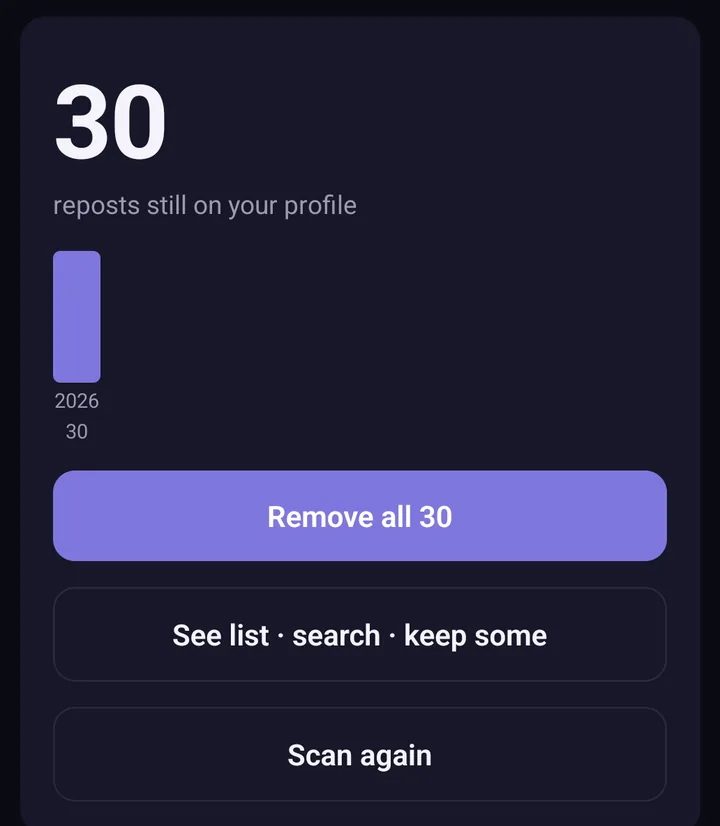
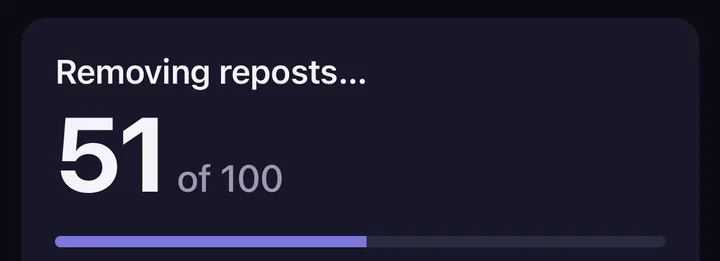
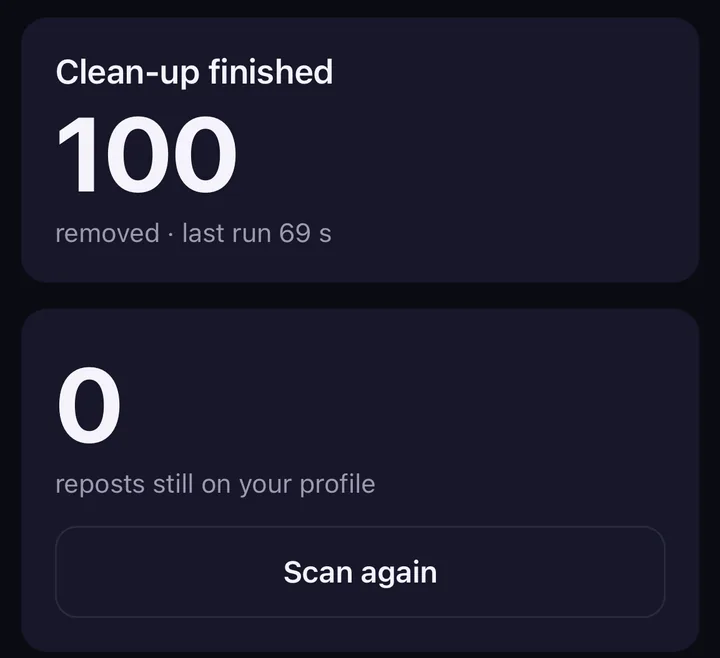
Screens from the test version of the Freshslate app. The final app may look slightly different.
- Scan first. It loads all your reposts and shows them in one list, with a chart of how many you reposted each year. You can search and sort by creator, caption or date.
- Lock the ones to keep. Tap the lock on any repost you want to save. Everything else is queued.
- Steady pace. It removes one repost about every 2 seconds, so it looks like normal use and TikTok is far less likely to block it.
- Pause and resume. Stop anytime, close the app, and pick up where you left off.
- Your password stays with TikTok. You sign in on TikTok's own page inside the app. Freshslate never sees your password, and there are no Freshslate servers. Your list stays on your phone.
It also unlikes videos and clears favorites in bulk if you want a fuller clean-up. Want to see it before it's out? Try the interactive demo on a sample profile.
Updated November 16, 2026. TikTok changes its menus from time to time; if a button has moved, tell us at [email protected].
Clear every repost without tapping each one
Freshslate scans your reposts, lets you lock the ones to keep, and removes the rest at a steady, safe pace.
- Remove every repost in one go, and lock the ones you want to keep
- Unlike videos and clear your favorites in bulk
- Find any video you watched in your TikTok data download
- You sign in on TikTok's own page. Your password and data stay with you