 Freshslate
How to download your TikTok data (and what to do with it)
TikTok will give you a file with a lot of what it keeps about your account: the videos you watched, your likes, your searches, your comments, your messages and more. Here's how to request it on your phone or computer, which options to pick, and how to actually read it once you have it.
Quick answer: In the TikTok app, go to Profile → ☰ → Settings and privacy → Account → Download your data. Choose which information to include (All data, or Custom with at least Activity and Comments ticked), pick JSON as the file format, and tap Request data. TikTok says it may take a few days to prepare the file. When it's ready, download the ZIP from the Download data tab. The file is available for up to 4 days. Open it in our free viewer to read it.
Why would you want this file? The most common reasons people request it:
- To find a video they watched months ago that's no longer in the app's watch history.
- To see a list of every comment they ever wrote, so they can go back and delete some.
- To see their TikTok "year" — how many videos a day, which hours, what they searched most.
- To keep a backup before deleting an account, switching phones, or in case TikTok goes away where they live.
- To see what TikTok knows about them.
How to request your TikTok data on iPhone and Android
The steps are the same on both phones.
- Open TikTok and tap Profile in the bottom right corner.
- Tap ☰ in the top right corner.
- Tap Settings and privacy.
- Tap Account.
- Tap Download your data. You'll see two tabs at the top: Request data and Download data.
- On the Request data tab, choose All data or Custom data. (See which to pick.)
- Under file format, choose JSON. (See why.)
- Tap Request data at the bottom.
That's it for now. Your request shows on the Download data tab while TikTok builds the file (in many versions it says Pending). You can close the app — you don't need to keep it open.
Can't find it? TikTok moves menus around. In Settings and privacy, use the search box at the top and type "download your data". TikTok's Help Center lists it under Account. If it isn't there in your version, check Privacy.
How to request your TikTok data on the website (PC or Mac)
If you'd rather do it on a computer, or the app keeps crashing, use tiktok.com in a browser like Chrome, Safari, Edge or Firefox.
- Go to tiktok.com and sign in.
- Click your profile picture (top right), or More in the left menu, then click Settings.
- Click Privacy.
- Find Download your data (in some layouts it's under a "Data" heading) and click it.
- Choose All data or Custom, pick JSON, and click Request data.
Downloading on a computer has one big plus: the ZIP lands in your Downloads folder, where it's easy to open and keep. A request made on the website shows up in the app too, and the other way around, because it's tied to your account. So you can request on your phone and download on your computer.
TXT or JSON: which file format should you pick?
"TikTok download data TXT or JSON" is one of the most searched questions about this. Here's the simple answer: pick JSON.
| JSON | TXT | |
|---|---|---|
| What it is | One structured file that apps and websites can read | Many plain text files, one per section |
| Reading it yourself | Messy to read by eye | Easier to read in Notes or Notepad |
| Opening in tools | Works best with tools like our viewer | Works with our viewer, but less reliably in other tools |
| Searching and sorting | Easy with a tool | Hard — you'd use Find in each file |
| Best for | Finding videos, seeing stats, keeping a backup | A quick look at one section |
JSON looks scary when you open it in a text app — lots of brackets and quote marks. That's fine. You're not meant to read it by eye. Tools like our watch history viewer turn it into a clean list. If you already asked for TXT, don't worry: our viewer can open TXT files too, so you don't need to request again.
All data or custom: which boxes to tick
When you request your data, TikTok asks if you want All data or Custom data.
- All data gives you everything. It's the easiest choice and the right one if you want a full backup. The file is bigger and can take longer.
- Custom data lets you tick only the parts you want. The file is smaller and is often ready faster.
If you go with Custom, here's what to tick based on what you want:
| If you want to… | Tick |
|---|---|
| Find a video you watched | Activity (includes watch history) |
| See your likes and favorites | Activity |
| See what you searched | Activity |
| See every comment you wrote | Comments |
| Get your "TikTok year" stats | Activity |
| Keep your chats | Direct messages (if listed) |
| A list of videos you posted | Videos or Posts (wording varies) |
| A full backup | Just pick All data |
For our free tools, the two that matter are Activity and Comments. The names of the boxes can be a bit different in your version (for example "Your activity" or "Profile and activity"). Pick the one that mentions activity or watch history.
How long does a TikTok data request take?
TikTok doesn't give an exact time. Its Help Center only says it may take a few days to prepare the file. What people usually report:
- Small or newer accounts: sometimes ready within a few hours.
- Most accounts: a day to a few days.
- Big, older accounts or "All data": can take up to several days.
There's no way to speed it up. Picking Custom with only the boxes you need can help, since there's less to put together. TikTok says it will notify you in the app when your file is ready. Notifications are easy to miss, so also check the Download data tab yourself once or twice a day.
How to download the file when it's ready
- Go back to Profile → ☰ → Settings and privacy → Account → Download your data (or the same page on the website).
- Tap the Download data tab.
- When your request says Download instead of Pending, tap it.
- TikTok may ask you to confirm it's you, for example by entering a code or signing in again. Do that yourself — never share the code with anyone.
- The file downloads as a ZIP, with a name like TikTok_Data_…zip.
Where does it go?
- iPhone: usually the Files app → Downloads (or "On My iPhone" → Downloads). If it opens in Safari, tap the download arrow and then the file to find it.
- Android: the Downloads folder. Open the Files app (or "Files by Google") and look under Downloads.
- Computer: your browser's Downloads folder.
Don't wait too long. TikTok says the file is available for up to 4 days. After that it expires and you'll have to request it again. Download it as soon as you see it, even if you don't have time to look at it yet.
What's inside your TikTok data
Once you open the file, you'll see it's split into sections. The names change a little between versions and between TXT and JSON, but these are the main ones:
| Section | What it has | Good for |
|---|---|---|
| Activity → Watch history (often "Video Browsing History") | Every video you watched, with date, time and a link. Usually about the last 6 months | Finding a video you saw |
| Activity → Like list | Videos you liked, with date and link | Seeing or cleaning up likes |
| Activity → Favorite videos (and sounds, effects, hashtags) | What you saved to Favorites | Finding saved videos |
| Activity → Search history | What you searched, with dates | Your top searches |
| Activity → Share history | Videos you shared, and how | Finding something you sent |
| Activity → Following / Follower lists | Accounts you follow and who follows you, with dates | A record of your follows |
| Activity → Login history | When you signed in, from what device and network | Checking for logins you don't recognize |
| Comments | Every comment you wrote, with date | Finding comments to delete |
| Direct messages | Your chats, with dates | Keeping old messages |
| Video / Posts | Videos you posted, with date and link | A list of your uploads |
| Profile | Your username, bio, email or phone, birthday | Checking what's on file |
| Ads and data / App settings | Ad interests, settings and other account details | Seeing how TikTok sees you |
A few things people expect but usually won't find: captions or creator names for each watched video (the file mostly has links, not titles), videos you scrolled past in a flash, and anything older than TikTok keeps for that section. Reposts often aren't listed as their own section either — the Reposts tab on your profile is the place for those (our reposts guide covers them).
Two more things TikTok itself warns about. Because of processing time, the last 24 to 48 hours of some data may not be in the file, so if you need a video you watched yesterday, wait two days before you request. And some data that would affect other people's privacy may be left out.
How to open and read your TikTok data
You have a ZIP full of JSON or TXT. Now what? You have two choices: open it with a tool that makes it readable, or dig through it by hand.
The easy way: our free tools (read in your browser only)
Each of these opens the ZIP, JSON or TXT file directly. You don't need to unzip it first. The file is read in your browser only — it's never uploaded to us or anyone else.
- Watch history viewer — every video you watched, by day, plus your likes, favorites and searches. Tap a link to open the video in TikTok.
- TikTok stats — your "TikTok year": how many videos a day, your busiest day, what hours you watch, your top searches.
- My TikTok comments — every comment you wrote, with links to the videos so you can go delete the ones you regret.
These work on a phone or a computer. On iPhone, tap the button to open a file and pick the ZIP from Files → Downloads.
The by-hand way
- Unzip the file. On a computer, double-click it. On iPhone, tap it in the Files app and it unzips into a folder next to it. On Android, open it in your Files app and tap Extract.
- Open the file inside. A JSON file opens in any text editor. A TXT export opens as separate text files.
- Use Find (Ctrl+F or Cmd+F) to look for a date, like "2026-10-03", to jump to that day.
This works, but JSON is hard on the eyes and the file can be very big, which makes some phones and text apps freeze. That's the main reason we built the viewer.
Problems downloading your TikTok data
Stuck on "Pending" for days
This is the most common complaint. Most of the time it just needs more time — a big account with All data selected can take several days. If it's been more than a week:
- Update the TikTok app and check the Download data tab again.
- Check on the website too. Sometimes the website shows the file as ready when the app doesn't.
- If there's still nothing, cancel the old request: on the Download data tab, tap Cancel, then Delete request. Then make a new request with Custom and fewer boxes ticked.
- If it never arrives, contact TikTok through Settings and privacy → Report a problem.
Making lots of requests in a row usually doesn't help. In many versions you can only have one request going at a time, which is why cancelling the old one first helps.
"Expired" or the download button is gone
The file is only kept for up to 4 days after it's ready. If you see "Expired", or the request has vanished, you need to request it again from the Request data tab. Download it as soon as it's ready next time.
The download won't start or fails
- Make sure you have enough free space on your phone. A big account can make a file of hundreds of megabytes.
- Switch to Wi-Fi.
- Try the website on a computer instead of the app.
- If TikTok asks you to verify it's you, finish that step first.
Can't open the ZIP on iPhone
Open the Files app, go to Downloads, and tap the ZIP once. iPhone unzips it into a folder with the same name. If tapping does nothing, press and hold the ZIP and choose Uncompress. Or skip unzipping completely: open our viewer in Safari and pick the ZIP — it reads it as is.
Can't open it on Android
Open the Files app (or Files by Google), find the ZIP in Downloads, and tap Extract. Or pick the ZIP straight from our viewer.
The file is too big or the text app freezes
Watch history alone can be tens of thousands of lines. Text apps on phones often can't handle it. Use a tool built for it, like our viewer, or open it on a computer. If even that's slow, request again with Custom and only Activity ticked.
The JSON looks like gibberish
That's normal for JSON. It's made for programs, not people. Open it with our viewer instead of reading it by eye.
Watch history in the file is shorter than expected
The watch history part usually only covers roughly the last six months. If you want a longer record, download your data every few months and keep each file.
Banned accounts, videos, messages and other cases
Can you download your TikTok data after a ban?
Sometimes. If your account is banned, try signing in — in many cases TikTok still lets you reach a screen with an option to download your data. If you can't sign in at all, you can ask through TikTok's privacy request form in the Help Center. There's no promise TikTok will give it to you, and it may take longer. If you think a ban might be coming, download your data now.
Does the data download include my videos?
It includes a list of the videos you posted, with links. It usually doesn't include the video files themselves in the ZIP. To save your own videos, open each one in the app and use the save option in the Share menu (if you allowed downloads on it). For drafts, see our drafts guide — drafts aren't in the data file.
Does it include deleted messages?
Generally no. The Direct messages section has the chats TikTok still has for your account. Messages you deleted from a chat usually aren't in it, so the data file isn't a way to get them back.
What about TikTok Studio?
TikTok Studio is for creator stats and posting. The data download lives in the main TikTok app and the website, not in Studio.
"Download TikTok data saver" — is that the same thing?
No. Data Saver is a different setting that lowers video quality so TikTok uses less of your mobile data plan. You'll usually find it under Settings and privacy → Cache and cellular (or "Data saver" in the settings search). It has nothing to do with downloading your account data.
Requesting data deletion instead
If you want TikTok to delete your data rather than send it, the main way is deleting your account in Settings and privacy → Account → Deactivate or delete account. Download your data first if you want a copy, because you can't get it after.
What's a TikTok "emergency data request"?
That's a process for police and courts, not for regular users. To get your own data, use Download your data.
Keep your TikTok data file safe
This file is personal. It can have your private messages, the email or phone number on your account, your login history with device and network details, and every video you watched. Treat it like a diary.
- Don't upload it to random websites. Many "TikTok analyzer" sites ask you to upload the file to their servers. Our tools never do — they read the file in your browser and nothing leaves your device.
- Don't send it to people unless you're sure, and never post a screenshot of the login or profile parts.
- Delete it when you're done if you don't want a backup. On iPhone, delete it from Files → Downloads, then from "Recently Deleted" in Files. On Android, delete it from your Downloads folder.
- Keep it somewhere private if you do want a backup, not in a shared folder.
- Check your login history while you're in there. If you see sign-ins from devices you don't know, change your password and turn on 2-step verification.
Questions people ask
How do I download my TikTok data?
Profile → ☰ → Settings and privacy → Account → Download your data, choose JSON, then Request data. Download it later from the Download data tab.
Should I pick TXT or JSON?
JSON. It works best with tools like our viewer. TXT also opens in our viewer if you already picked it.
How long does it take to download your TikTok data?
TikTok says it may take a few days to prepare the file. Small requests are sometimes faster, and bigger accounts with "All data" can take longer.
How long is the TikTok data download available?
Up to 4 days after it's ready, according to TikTok. After that you need to request it again.
Why is my TikTok data request still pending?
It's still being made. Wait a few days, check on the website, and request again with fewer boxes if it never arrives.
What does it mean to download TikTok data?
It means asking TikTok for a copy of the information it keeps about your account, sent to you as a ZIP file.
Is downloading your TikTok data free?
Yes, TikTok doesn't charge for it.
Does TikTok tell anyone when I download my data?
No. Only you see the request.
Does the data download have my full watch history?
It has roughly the last six months, about the same as the app shows.
Can I download TikTok data on a computer?
Yes. On tiktok.com, go to Settings → Privacy → Download your data.
How do I open TikTok data on iPhone?
Tap the ZIP in the Files app to unzip it, or pick the ZIP directly in our viewer in Safari.
Can I download my TikTok data from a banned account?
Sometimes. Try signing in to find the option, or use TikTok's privacy request form.
Does the data download include deleted messages?
Usually not. It includes the chats TikTok still has.
Can I request my data more than once?
Yes, but usually only one request at a time. Wait until the current one is done, or cancel it from the Download data tab.
How do I cancel a TikTok data request?
Go to Settings and privacy → Account → Download your data, open the Download data tab, tap Cancel, then tap Delete request.
Why is yesterday's activity missing from my file?
TikTok says the last 24 to 48 hours of some data may not be included because of processing time. Request again in a couple of days if you need it.
Is it safe to open my TikTok data in an online tool?
Only if the tool reads it on your device. Ours do; many others upload your file.
Faster: open your TikTok data on your phone with Freshslate (coming soon)
Requesting the file, waiting, finding the ZIP and opening it is a lot of steps. Freshslate, our app coming soon to iPhone and Android, has a Watch History Finder that opens TikTok's data file right on your phone and shows each video so you can search by date and creator. You sign in on TikTok's own page inside the app, Freshslate never sees your password, and there are no Freshslate servers — your file stays on your phone.
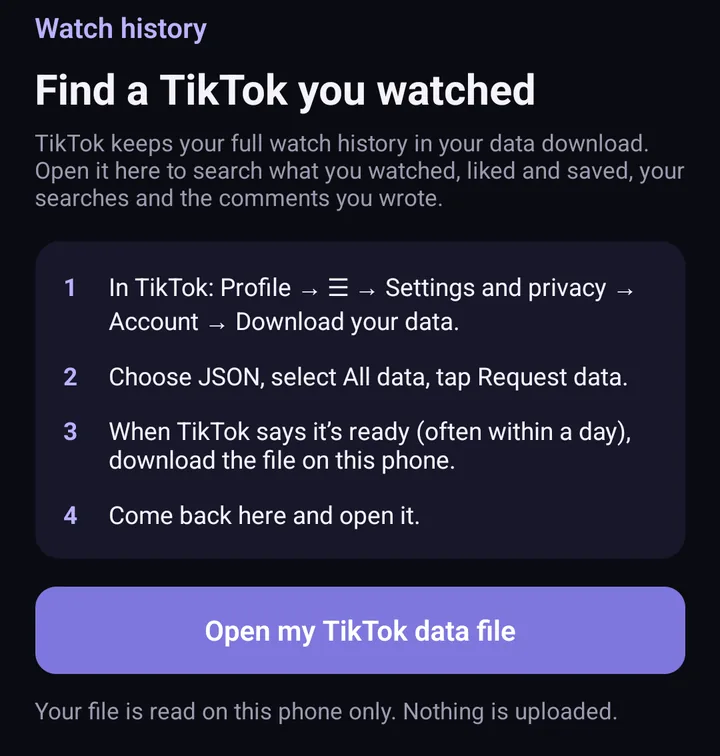
Screens from the test version of the Freshslate app. The final app may look slightly different.
Until then, our free watch history viewer, TikTok stats and comments tool do the job in your browser.
Updated November 16, 2026. TikTok changes its menus from time to time; if a button has moved, tell us at [email protected].
Open your data file on your phone
Freshslate's Watch History Finder opens TikTok's data file right on your iPhone or Android phone, with nothing uploaded.
- Remove every repost in one go, and lock the ones you want to keep
- Unlike videos and clear your favorites in bulk
- Find any video you watched in your TikTok data download
- You sign in on TikTok's own page. Your password and data stay with you